Free Proxmox Backup: MSP360 Community Edition Host-Level Solution
We are excited to announce the release of MSP360 Backup for Proxmox Community Edition, a dedicated build designed to provide a reliable, free Proxmox backup solution at the hypervisor level. This release brings the same powerful, host-level capabilities found in our commercial VM Edition to a completely free product. Built specifically for IT specialists and small teams, this free Proxmox backup software comes with no time restrictions and defined usage limits.
[content]
Secure, Host-Level Free Proxmox Backup
The Community Edition backs up Proxmox at the hypervisor level. The Backup Agent installs on a Windows machine with network access to your Proxmox VE host and connects through the Proxmox API - nothing is installed on the host itself, and no Proxmox Backup Server is required. From there you can protect all VMs on a host or a specific selection of VMs, capturing complete VM disk images including all attached virtual disks.
The workflow is the same one used for Windows Server backup software and Hyper-V backup software in MSP360. Scheduling supports Full, Incremental, and Forever Forward Incremental backup types, with flexible retention including the GFS approach.
On the restore side, you can restore VMs back to a Proxmox server, choose the target datastore, rename VMs if needed, and power them on automatically after the restore completes.
What the free edition covers and where the limits are
Community Edition is free to use with no time limit and no trial period to track. In exchange, it comes with a few boundaries:
- 1 Proxmox host (up to 2 CPU sockets) per installation.
- Up to 5 TB of backup storage.
- Proxmox VE.
This build is dedicated to Proxmox host backup. VMware backup and Hyper-V backup are not part of the Community Edition. File-level and image-based backup remain subject to standard Freeware restrictions.
Proxmox backup is available on any supported Windows machine, including Windows Server and domain-joined machines. File-level and image-based backup plans cannot be created on Windows Server or domain-joined machines.
Free vs. Commercial: Which to Use
If free Proxmox backup software within these limits is all you need, Community Edition is the product. If you need to back up Proxmox alongside other paid workloads (VMware, Hyper-V) or go beyond the host and storage limits, that's what the commercial VM Edition is for. The two are separate paths: Proxmox backup in a commercial license is delivered through VM Edition, not the free Community Edition build.
Requirements of MSP360’s Free Proxmox Backup
To get started you'll need:
- A Windows machine with network access to your Proxmox VE host (a separate machine, or a guest VM on the same Proxmox host).
- Backup Agent version 8.7.
- A dedicated Proxmox user with the right permissions.
- An open port for the agent to reach the host.
Full setup details are in our Knowledge Base.
How to get started with Free Proxmox Backup Community Edition
Getting started with MSP360 Backup Community Edition for Proxmox takes just a few steps:
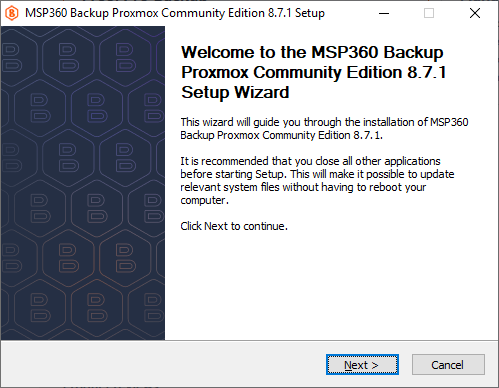
- Download and install the Community Edition on a Windows machine that has network access to your Proxmox VE host. If MSP360 Backup is already installed, the Community Edition build will replace the existing standalone installation.
- Activate Community Edition when you launch the product. There is no trial period, so you can start using the free edition right away. For commercial Proxmox backup, use MSP360 Backup VM Edition.
- Connect your backup storage and add your Proxmox VE host using a dedicated Proxmox account with the required permissions.
- Create a Proxmox backup plan, select the host or VMs you want to protect, choose the backup type and schedule, and configure retention.
- Run your first backup. Once a restore point is available, you can restore protected VMs back to Proxmox when needed.
The Community Edition can be installed on Windows Server and domain-joined machines for Proxmox backup. File-level and image-based backup capabilities remain subject to their own Freeware limitations and are not available on server operating systems or domain-joined machines.
Download MSP360 Backup Community Edition for Proxmox →
Free Proxmox backup without the usual trade-offs
MSP360 Backup Community Edition for Proxmox is a dedicated free build for Proxmox VE backup. It includes:
- Hypervisor-level backup for Proxmox VE
- Up to 5 TB of backup data
- Full, Incremental, and Forever Forward Incremental backup
- Flexible retention, including GFS
- Backup to supported cloud and local storage
- VM recovery back to Proxmox
- Support for Windows desktop, Windows Server, and domain-joined machines
- No trial period and no time limit
The Community Edition is installed instead of another MSP360 standalone build, not alongside it. With the free Proxmox CE license, VMware and Hyper-V backup are not available.
If you need commercial Proxmox backup, use MSP360 Backup VM Edition. Proxmox backup is not enabled by activating another commercial standalone license, such as SQL Server Edition. In other words, there are two paths for Proxmox backup: the free Community Edition or the commercial VM Edition.
The build also includes the standard freeware file-level and image-based backup capabilities, subject to their existing restrictions. These plans cannot be created on Windows Server or domain-joined machines, while Proxmox backup remains available on those systems.
MSP360 Backup Community Edition for Proxmox is available now with no trial, no time limit, and no software subscription required.
MSP360 Backup for Proxmox. Free.
Host-level backup and recovery for Proxmox VE: install on Windows, protect your hosts, restore straight back to Proxmox.