
Backup to Amazon S3 with MSP360
Protect business data with backup to Amazon S3 across physical, virtual, and SaaS environments.
Flexible Storage Options
File and Image-Based Backup
Object Lock Support

MSP360 Backup to Amazon S3
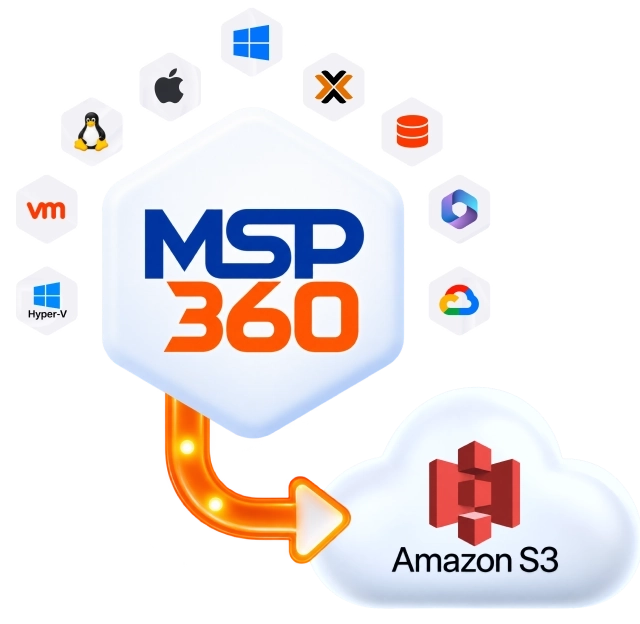
MSP360 backup solutions protect desktops, servers, virtual machines, Microsoft 365, and Google Workspace with Amazon S3. Connect an existing AWS account or use MSP360 Storage Powered by Amazon S3.
Windows Desktop Backup
Avoid downtime and data loss on Windows-based endpoints with file-level and image-based backups.
Windows Backup SoftwareMSP360 Backup for Windows Desktop
Works on
Linux Backup
Protect your valuable files and folders with MSP360 Backup Pro for Linux, using local or cloud storage with flexible retention and scheduling.
Cloud Backup for LinuxMSP360 Backup Pro for Linux
Works on
macOS Backup
File-level backup for Mac desktops and laptops, built for small teams without dedicated IT.
macOS Backup SoftwareMSP360 Backup for macOS
Works on
VMware Backup
Offers application-consistent backups and Changed Block Tracking (CBT) for efficient incremental backups.
VMware Backup SoftwareMSP360 Backup for VMware
Works on
Hyper-V Backup
Back up virtual machines on Hyper-V Failover Clusters and use Changed Block Tracking for faster, more efficient incremental backups.
Hyper-V Backup SoftwareMSP360 Backup for Hyper-V
Works on
Proxmox Backup
Hypervisor-level VM backup with no agent on the host – connects to Proxmox via API for encrypted, incremental VM snapshots.
Proxmox Backup SoftwareMSP360 Backup for Proxmox VE
Requires a Windows machine with network access to the Proxmox host.
Windows Server Backup
Back up and restore Windows Server data quickly, with multiple integrity checks to help ensure reliable recovery.
Windows Server Backup SoftwareMSP360 Backup for Windows Server
Supported for
SQL Server Backup
Protects databases and transaction logs while maintaining consistency, with pre- and post-backup actions and selective database targeting.
SQL Server Backup SoftwareMSP360 Backup for SQL Server
Supported for
Microsoft 365 Backup
Cloud-to-cloud backup for Microsoft 365 workloads, with centralized management and recovery for core Microsoft 365 services.
Microsoft 365 BackupMSP360 Backup for Microsoft 365
Supported for
Google Workspace Backup
Cloud-to-cloud backup and data protection for Google Workspace, with centralized management for all core Google components.
Google Workspace BackupMSP360 Backup for Google Workspace
Supported for
Built for MSPs
MSP Platform
MSP360 Managed Backup is part of the MSP Platform.
Great for MSPs or businesses with multiple endpoints. One-stop-shop console with flexible monthly or annual payments. Ideal for MSPs and large IT departments.
MSP Platform Features
- Centralized management
- Advanced Reporting and Alerting
- Rebranding
- ChatGPT and Claude integration
- Mobile Application
- MSP360 Connect Included
- Support: 24/7/365 live technical support
How Does MSP360 Backup to Amazon S3 Work?
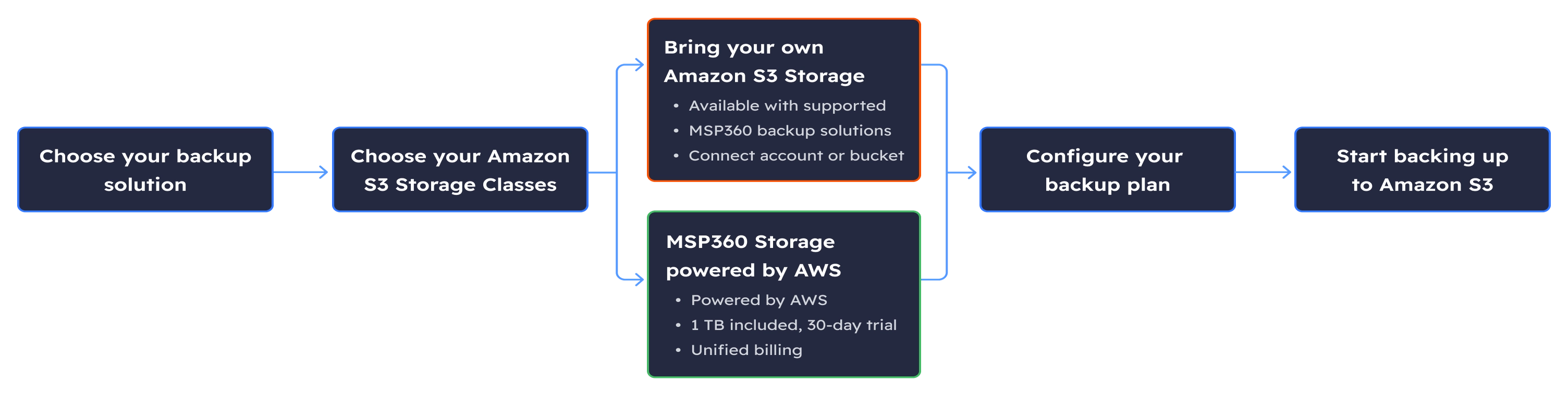
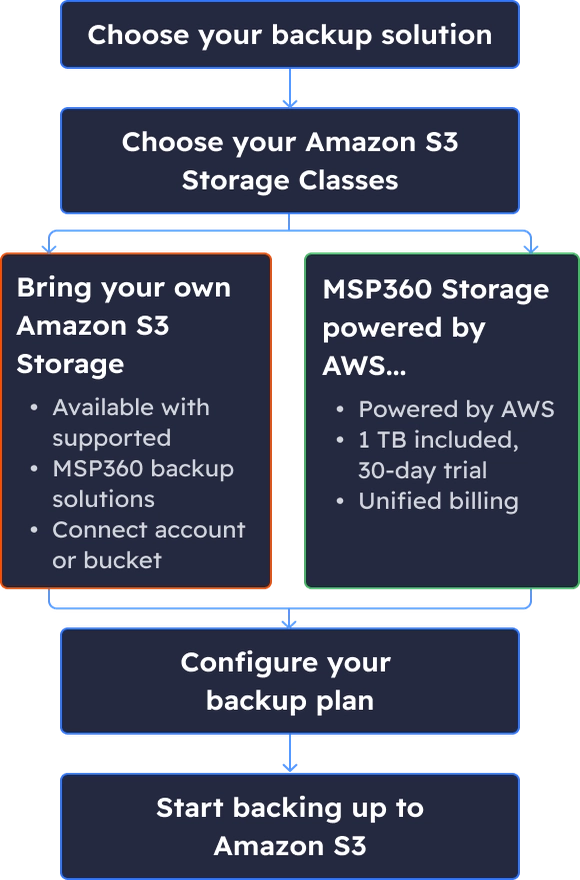
MSP Platform offers 2 options: built-in MSP360 Storage powered by AWS for easier setup, or connect and manage your own Amazon S3 storage.
Amazon S3 Options in MSP360 Platform
| Bring Your Own AWS | MSP360 Storage Powered by AWS | |
|---|---|---|
| Account ownership | You own and control the AWS account | MSP360 owns the underlying account; you get a managed allocation within it |
| Provisioning | You create or connect the bucket yourself | MSP360 provisions the storage for you |
| Billing | Two bills – MSP360 licenses and Amazon S3 storage separately | Unified – licenses and storage on one invoice |
| Price source | Minimum price – starts at $0.99/TB/month for S3 Glacier Deep Archive. Amazon S3 Standard own pricing – starts at $23/TB/month, Pay-As-You-Go | FMSP360 + Amazon S3 Standard – flat $23/TB/month |
| Monthly minimum | No monthly minimum | 1 TB |
| Object Lock availability | Supported – Default or GFS Object Lock, configured by you | Supported – Default or GFS Object Lock |
| Support ownership | AWS supports the storage account; MSP360 supports the backup software | MSP360 supports both the backup software and the storage relationship |
| Best-fit customer | Already using AWS, or wants a separate storage vendor relationship | Wants one vendor and one invoice for backup + storage |
Connect Your Amazon S3 Storage in 3 Simple Steps
Keep Control of Your Backup Storage
Choose where your backup data lives
Connect your own Amazon S3 account and keep direct control over your storage configuration, credentials, regions, and retention settings.
Separate backup software from storage
MSP360 works with Amazon S3 and other leading cloud storage providers, so your backup strategy is not tied to proprietary built-in storage.
Reduce your cost by using different storage classes
With your own AWS account, you can use different storage classes for your Amazon S3 buckets. Lifecycle rules can help reduce costs by moving backups to lower-cost storage classes.
Protect recovery points with immutability
AWS Object Lock support lets you apply immutable retention to help protect backups against deletion, modification, and ransomware.
Scale without redesigning your backup environment
Add storage accounts and choose the storage destination that fits each workload, customer, or data-protection requirement.
Amazon S3 Storage Classes Comparison (available with BYOS approach)
| MSP360 + S3 Standard | S3 Standard | S3 Intelligent-Tiering | S3 Standard-Infrequent Access | S3 One Zone-Infrequent Access | S3 Glacier Instant Retrieval | S3 Glacier Flexible Retrieval | S3 Glacier Deep Archive | |
|---|---|---|---|---|---|---|---|---|
| Price Per 1 TB | $23 flat | from $23 | $10-$23 | $12.50 | $10 | $4 | $3.60 | $0.99 |
| API Calls | Free | Paid | Paid | Paid | Paid | Paid | Paid | Paid |
| Data Egress Fee | Free | Free | Paid | Paid | Paid | Paid | Paid | Paid |
| Minimum Retention Period | — | — | — | 30 days | 30 days | 90 days | 90 days | 180 days |
| MSP360 Managed Backup + AWS | ||||||||
| Object Lock Support (Immutability) | ||||||||
| File and Image-Based Backup | ||||||||
| Synthetic Full Backup | ||||||||
| GFS | ||||||||
| Restore Verification | ||||||||
| Encryption | ||||||||
| FFI Backup | ||||||||
| Unified Billing | ||||||||
Related Resources
To explore more about MSP360 backup solutions and data protection best practices, visit our Resources Center.
Article
Getting Started with MSP360 Managed Backup and Amazon S3
A walkthrough of connecting your Amazon S3 account to MSP360 Managed Backup and setting it up as a backup destination, from access keys to your first plan.
Article
Compare AWS, Microsoft Azure and Google Cloud for Backup
AWS, Azure or Google Cloud? See how the three stack up on storage tiers, data protection and what backup will actually cost you
Article
Geo-Redundancy Clash: Amazon S3, Microsoft Azure and GCP
AWS, Azure and Google Cloud don’t copy your data between regions the same way. We put their replication options side by side so you can pick the one that fits your backup setup.
Article
Amazon S3 as a Backup Storage Destination
Standard, Glacier or something in between? A look at S3 storage classes, how you’re billed, and the security settings worth enabling before you send backups there.
Article
Data Backup to AWS EU Sovereign Cloud with MSP360 Backup
If your data has to stay in the EU, AWS European Sovereign Cloud is an option. Here’s how to use it as a backup destination in MSP360 Backup PRO.
FAQ for Backup Integration with Amazon S3
Can MSP360 backup to Amazon S3?
Yes. Amazon S3 Cloud Storage is a supported backup destination across MSP360's backup products.
Can I use an existing Amazon S3 account and bucket?
Yes. Connect your existing Amazon S3 account credentials and select the bucket you want to use for backups.
What is MSP360 Storage Powered by AWS?
MSP360 Storage Powered by AWS is built-in Amazon S3 storage. It is available with MSP360 Managed Backup Products and MSP360 Backup for Microsoft 365 and Google Workspace. MSP360 sets up and manages the storage, so you do not need a separate AWS account. Storage is billed through MSP360.
Which MSP360 products support Amazon S3?
MSP360 supports Amazon S3 Storage across its Backup products: Windows, Linux, macOS, VMware, Hyper-V, Proxmox, Windows Server, SQL Server, and SaaS backup, including Microsoft 365 and Google Workspace.
Does MSP360 support Amazon S3 Object Lock?
Yes, on both storage paths. MSP360 supports Object Lock for Amazon S3, including Default Object Lock (tied to your storage provider settings) and GFS Object Lock (configured manually), letting you define a retention period during which backups can't be modified or deleted.
What are the minimum storage and early-deletion terms?
They depend on the storage option and storage class. For your own AWS account, Amazon S3 Standard has no minimum storage duration. S3 Standard-IA and S3 One Zone-IA have a 30-day minimum; S3 Glacier Instant Retrieval and S3 Glacier Flexible Retrieval have a 90-day minimum; and S3 Glacier Deep Archive has a 180-day minimum. Terms for MSP360 Storage Powered by AWS depend on the MSP360 Backup products.
How are backups encrypted?
MSP360 supports client-side AES-256 encryption for endpoint, server, and VM backups before data leaves your environment. Microsoft 365 and Google Workspace backups use HTTPS in transit and AES-256 at rest.
What is included in each free trial?
If you connect your own Amazon S3 account, storage charges and any free-tier benefits are handled directly by Amazon. MSP360 Storage Powered by AWS includes trial storage, with terms depending on the MSP360 product. Managed Backup includes 1 TB for 30 days, while MSP360 Backup for Microsoft 365 and Google Workspace includes 1 TB for 15 days.