While having a timely created backup is essential, the ease and speed of its retrieval is also a major concern. This task often requires special tools, especially when the backup data are stored on a geographically distant server which takes a long time to answer the requests. We are going to describe some Amazon features that would help.
data that a company can afford to lose after an outage and a consequent recovery. RTO defines the maximum time spent between an outage and full recovery of the infrastructure. It basically corresponds to the time required for data retrieval from the latest backup.
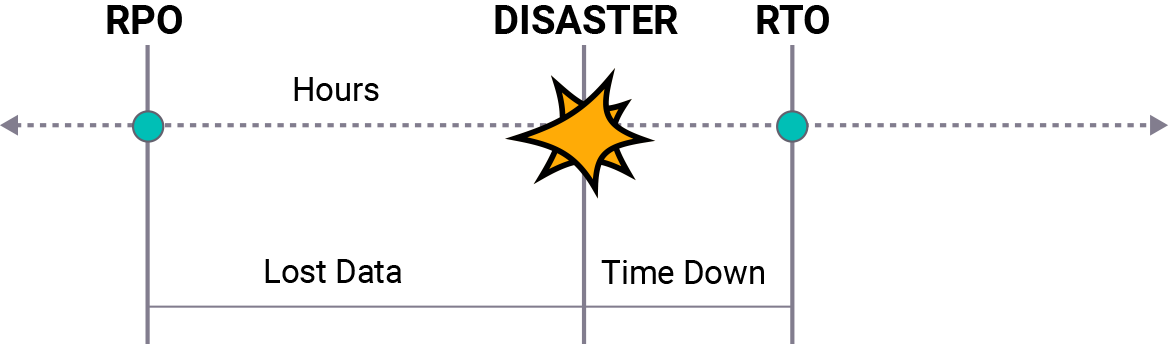
Naturally, businesses want to avoid any information losses and on the other hand - to be able to get their information back from storage at once. There are two ways to meet these goals:
- Reduce RTO: retrieve the data from storage faster
- Reduce RPO: make backups more often
However, each company faces certain technical and financial limitations. For example, a 10 TB copy requires about 24.5 hours to be transferred through a 1 Gbps channel. Thus, the ability to reduce RTO is limited by network bandwidth. As for RPO, more frequent backups increase the load on the network. As a result, upload/download speeds are likely to drop and a company would lose even more time.
Further reading RTO vs. RPO: Two Means Toward the Same End
A standard AWS storage scheme foresees copying user data to a geographically distant AWS server. The great distance increases latency so that creating several big backups a day can be problematic. Amazon has developed two features that help to avoid spending too much time: S3 Acceleration and AWS Import/Export Snowball.
Amazon S3 Transfer Acceleration
Amazon S3 Transfer Acceleration is a new built-in feature implemented in Amazon S3. When enabled for a bucket, it speeds up data exchange with this bucket up to 6 times. Users can enable data transfer acceleration for a single S3 bucket, enabling a special Accelerated mode. After that, an alternative name is generated for this bucket. Specifying this name in a backup plan enables faster uploading and downloading.
Amazon uses its own networking resources to ensure accelerated data transfer. For each session, an optimal route based on AWS's own backbone network is selected. This route is built dynamically: channels with bigger bandwidth and less traffic load are found for each separate upload/download session.
Further reading Amazon S3 Transfer Acceleration in MSP360 Drive
Speeding up data transfer does not result in security level reduction. All data uploaded in the accelerated mode as well as in the standard mode are encrypted. Besides, these data are not stored on transit AWS edge locations, and that eliminates the risk of their leakage.
AWS Snowball
AWS Snowball is a hardware solution that transports up to 50 TB of data directly from the user's location to the AWS network. Snowball devices are shipped to AWS users on demand. A request is sent from the standard AWS console and it takes about two days for AWS to ship a Snowball (it also depends on post services' performance).
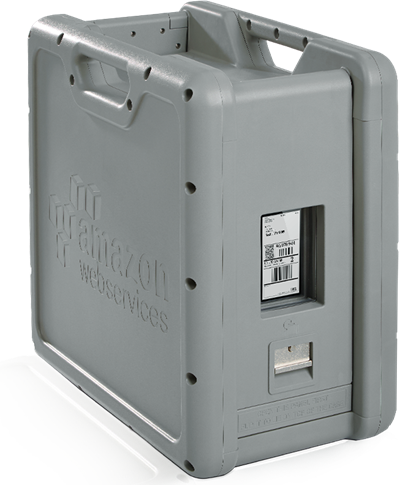
On receiving one, users have to connect it to their network, install AWS S3 client on it, transfer the file or system image copies, and then ship it back. Data transferred to a Snowball device are automatically encrypted. After a device is shipped back, the user receives notifications about the progress of data extraction and transferring to the user's S3 buckets. In the USA, the overall cost of creating a huge backup using Snowball will be several times lower than via a high-speed Internet connection.
Further reading Working with AWS Snowball in MSP360 Backup
Physically transporting huge amounts of data this way helps to save networking resources. Let us imagine a situation when a user needs to make a 25 TB backup in an AWS S3 bucket, but his network can supply only 2,4 Gbps. It would take about 25 hours even using the full bandwidth. In fact, the actual time of backup creation would be much longer as other tasks generate additional load in this network. Retrieval time would also vary depending on the type of retrieved data and changes in traffic load. A Snowball device would carry the necessary data itself while the user's network would be fully available for other tasks.
Transfer Acceleration vs Snowball Comparison Table
Price is usually the first thing to consider: you just need to calculate how much it will cost in both cases. Another crucial concern is a upload\download time, so ordering a Snowball device by post could be much faster. For example, when creating a huge backup, it is better to ensure it comes cheap. In case of disaster recovery of all that data, it is usually more important to finish it ASAP.
Let us imagine two cases in order to get some real numbers:
- Restoring 10 TB of data from Amazon S3 storage
- The same, but the volume is 50 TB
The accelerated download means Amazon will charge you with:
- Special Acceleration fee: $0.04 per 1GB downloaded.
- Standard Data Transfer fee: $0.085 per 1GB, given that this 10 TB download was not the only time you have used Amazon S3 within the same month.
The overall time of restoration depends greatly on your available bandwidth as well as on the actual geographic location of the S3 bucket. Let us suppose your network and your AWS storage are both located within the US and you possess the aforementioned 2.4 Gbps channel. Then the 10 TB restoration is likely to be completed within one day. It is better however to check by yourself with Amazon's Accelerate Speed Calculator how faster it would be when compared with your standard retrieval operations from the Amazon cloud.
Now about AWS Snowball: you'll only need one Snowball 50 TB device for 10 TB of your data. It will cost $200 plus $0.03 per 1 GB retrieved. Some postal shipment fees might be added as well. The normal time of shipment is 2 days, after that, you can instantly copy your data from the device.
The total cost of retrieving 10 TB of data.
Comparison between S3 Acceleration and S3 Snowball |
|
S3 Acceleration |
S3 Snowball (50TB) |
| Cost |
$0.04(acc. fee) + 0.085(std. fee))*10*1024GB(data retrieved) = $1,280 |
$200(device) + $0.03(fee)*10*1024 GB(data retrieved) = $507.20 |
| Time |
1 day |
2 days |
| Additional Fees |
None |
Shipping fees |
| Other issues |
Depends on your network |
Depends on your physical location |
If you need to retrieve a 50 TB backup, you'll have to pay the same Acceleration fee while the Data Transfer fee will be $0.07 per 1GB downloaded. It will take about 5 days respectively. Or, you can order the same Snowball 50 TB device and receive it within 2 days or so. In fact, it may occur that a 50 TB storage device is not enough for 50 TB of data - it may lack just a few free bytes. Then you will have to order a Snowball 80 TB device and pay $250 for it.
The total cost of retrieving 50 TB of data.
Comparison between S3 Acceleration and S3 Snowball |
|
S3 Acceleration |
S3 Snowball (80TB) |
| Cost |
$0.04(acc. fee) + 0.07(std. fee))*50*1024GB(data retrieved) = $5,632 |
$250(device) + $0.03(fee)*50*1024 GB(data retrieved) = $1,786 |
| Time |
5 days |
2 days |
| Additional Fees |
None |
Shipping fees |
| Other issues |
Depends on your network |
Depends on your physical location |
So, S3 Acceleration will be the best option if you've got plenty of unused pre-paid bandwidth. However, in the case of a single large-scale exchange operation, S3 Snowball will typically be more helpful.
Conclusion
Sometimes it is crucial to use additional tools to get the job done fast, otherwise, financial or time losses may follow. That is why these Amazon’s features enabling accelerated transferring of backup data are a good choice for customers operating with huge volumes of information.
MSP360 closely cooperates with Amazon in order to provide the best experience for its customers who own AWS storage or consider acquiring one. Our solutions MSP360 Backup (beginning from version 4.8.2) and MSP360 Explorer (beginning from version 4.6) also support both Amazon S3 Acceleration and Amazon Snowball features.