Acronis vs MSP360 for MSPs: Backup, Pricing and Management
Both MSP360 and Acronis Cyber Platform allow MSPs to securely back up their customers' data. However, comparing Acronis vs. MSP360, there are significant differences between the two services in terms of licensing, data location, and management.
These are all important considerations when deciding which product would be most suitable to offer your customers: the cost of licensing, location of the data, method of restoring data, and other areas of the customers' IT that may be managed.
In this article, we compare these areas, as well as backup and restore functionality and other useful add-on products available to MSPs.
Acronis vs MSP360: Key Differences
| Feature | MSP360 | Acronis Cyber Platform |
|---|---|---|
| Cloud storage | Broad BYOS support, including direct backup to supported public clouds | Acronis-hosted and third-party storage, with licensing requirements for direct public cloud backup |
| Licensing | Pay-as-you-go licensing | Package-based and service-based licensing |
| Microsoft 365 and Google Workspace | Per-user licensing, with separate per-domain licensing for SharePoint/Teams or Shared Drives | Per-workload and per-GB models |
| MSP management | Backup, RMM, remote access, and tickets, with third-party PSA integrations | Backup, security, RMM, PSA, and disaster recovery services |
Management Console
MSP360
MSP360 allows you to manage your backups from a centralized console. You can manage customers and backup plans, monitor jobs and view reports for all your clients. Technicians can create, modify, run and stop backup plans from the console instead of going to each machine.
Backup templates allow you to assign settings and backup plans to computers, companies or groups of computers by tag. If you have multiple endpoints that share the required OS and backup destination, you can quickly configure new clients or apply a common backup plan to many machines.
If you want to consolidate separate solutions like Backups, RMM, and a Ticketing system, MSP360 fits your needs as an All-in-One Platform.
Acronis
Acronis provides a centralized console for managing backups and other cyber protection services across customers. Partner-level protection plans help MSPs apply consistent backup policies while maintaining customer-specific storage and encryption settings.
However, partner-level plans do not support application backup, so MSPs may need separate customer-level configurations for certain workloads.
Storage Options
MSP360
MSP360 lets you choose where to store your backups. You can back up to popular cloud storage options like Amazon S3, Microsoft Azure, Wasabi, Backblaze B2, Google Cloud, and S3-compatible storage. You can also back up to local drives and network storage such as local HDDs and SSDs, Network shares, or NAS devices depending on your workload and product configuration.
Note: Unlike Acronis’s Windows-only Direct Backup to Public Cloud[1] feature, MSP360 also supports direct cloud backup from Linux and macOS.
You can choose which storage provider you want to use based on your client's needs. If you already have a cloud storage provider, you can use that account for supported client backups and monitor your storage costs separately from your software costs.
MSP360 also offers built-in storage powered by Wasabi and Amazon S3 if you want to purchase storage through MSP360.
Acronis
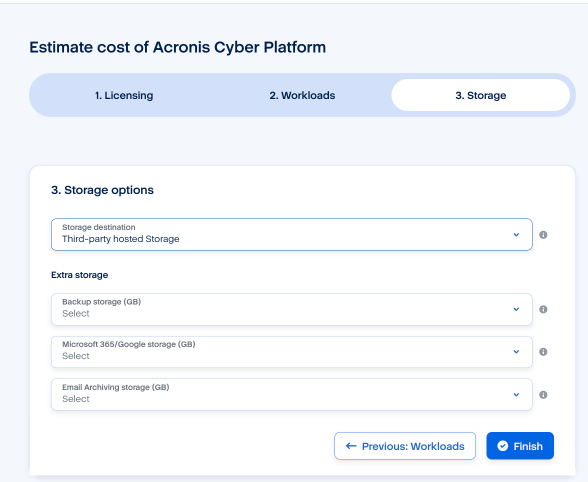
Acronis supports its own hosted storage, partner-hosted storage and local destinations. You can also connect supported third-party cloud storage, including Amazon S3, Microsoft Azure and S3-compatible services. However, configuring this direct connection can be more complicated because the requirements depend on your licensing: solution-based plans require Ultimate Protection, while service-based licensing requires enabling Direct Backup to Public Cloud, which may incur additional charges. Using your preferred cloud provider therefore means accounting for the required Acronis features and any associated fees alongside storage costs.
This direct-to-cloud option is limited to agents running on Windows and is not available for Microsoft 365 or Google Workspace backups.
Recovery Capabilities
MSP360
MSP360 supports file-level recovery, image-based restore, and bare-metal recovery, giving MSPs options for everything from accidentally deleted files to complete system failures. Individual files can also be recovered from supported image-based backups without restoring an entire machine.
For virtual environments, MSP360 supports backup and recovery workflows for VMware, Hyper-V, and Proxmox. With the new backup format, supported recovery scenarios include restoring VMware and Hyper-V backups to Proxmox, as well as restoring image-based backups as Hyper-V virtual machines. These options can be useful when recovering workloads or moving between virtualization platforms.
Acronis
Acronis also supports file-level, image-based, and bare-metal recovery for supported workloads. It additionally offers disaster recovery services that allow MSPs to prepare cloud-based recovery environments for protected servers.
With Acronis Disaster Recovery, MSPs can perform test failovers, switch supported workloads to cloud recovery servers, and use runbooks to automate recovery procedures. These capabilities can be valuable for customers that need more than backup restoration, although additional licensing may apply depending on the configuration
Pricing Models
MSP360
MSP360 uses a pay-as-you-go licensing model that lets MSPs add backup licenses as they onboard new customers, without purchasing a large pool of licenses upfront. You can manage licenses and view estimated costs directly in the console.
A minimum monthly payment of $25 applies to monthly billing. Volume discounts are also available, and there is no requirement to sign a long-term contract. This gives MSPs flexibility to adjust their licensing as their customer base grows.
Storage Cost: 1 TB
MSP360 Storage powered by Wasabi costs $7.99 per TB per month, with a minimum billable volume of 1 TB and a minimum storage duration of 30 days. This price excludes backup licenses and applicable taxes. There are no egress or API charges.
Your actual storage costs depend on the amount of backup data stored, including retained versions.
MSP360 also allows you to charge your customers for storage. You can enter your storage cost and resale price in the billing section of the console. You can also set different prices for each customer and offer fixed storage packages, usage-based pricing or a combination of both. This helps you estimate the storage margin for each service using your configured rates. You will still need to factor in your software licenses and other expenses when pricing your services.
MSP360 also offers a Price Guarantee for eligible Managed Backup customers. It helps MSPs keep their applicable license rates predictable as their businesses grow, provided their accounts remain active and in good standing. The guarantee is subject to program terms and exceptions and does not cover storage or third-party services.
Acronis
Acronis offers package (solution-based) and service-based licensing. Packages will include various services and storage if applicable. You can also choose to license by workload or amount of data with their service-based licensing. There are many options to choose from when offering your customers a backup service with Acronis.
Acronis has some server and workstation packages that pool storage at the customer level and will charge you if you go over that amount. You cannot mix solution-based and service-based licensing within the same customer tenant. You can have different customers use different types of licensing. Acronis also has minimums that you will need to commit to each month. This may vary if you go through a distributor.
Pricing Comparison: Backup for Windows
Disclaimer: The prices below are estimates and may vary based on your configuration, storage usage, and applicable discounts. All prices are in US dollars (USD). The calculations use MSP pricing from the MSP360 Cost Calculator, with “MSP” selected as the company type, and the Acronis Pricing Calculator for MSPs. Contact each vendor’s sales team to discuss your requirements and receive a personalized quote.
For this example, we compared the monthly licensing cost of backing up 50 physical Windows computers directly to third-party public cloud storage, excluding storage charges.
MSP360
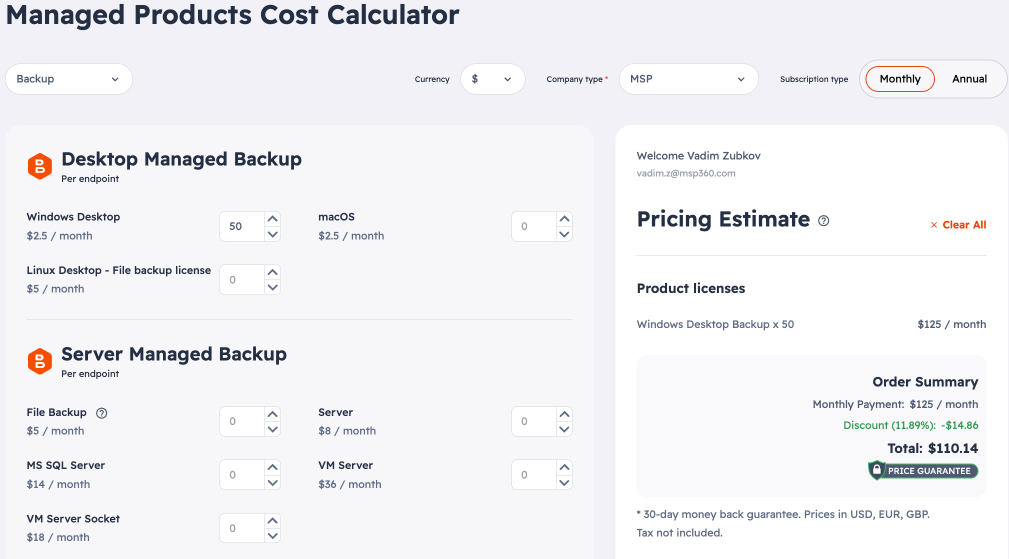
With MSP360 Managed Backup, 50 Windows Desktop backup licenses cost $110.14 per month at the selected calculator rates.
Note: Direct backup to supported cloud storage is included without a separate add-on license.
Acronis
With Acronis, using service-based, per-workload licensing, the monthly cost is:
- 50 Standard Workstation licenses at $4.10 each: $205
- Direct Backup to Public Cloud for the same 50 workstations at $1 each: $50
That brings the total to $255 per month, plus cloud storage costs.
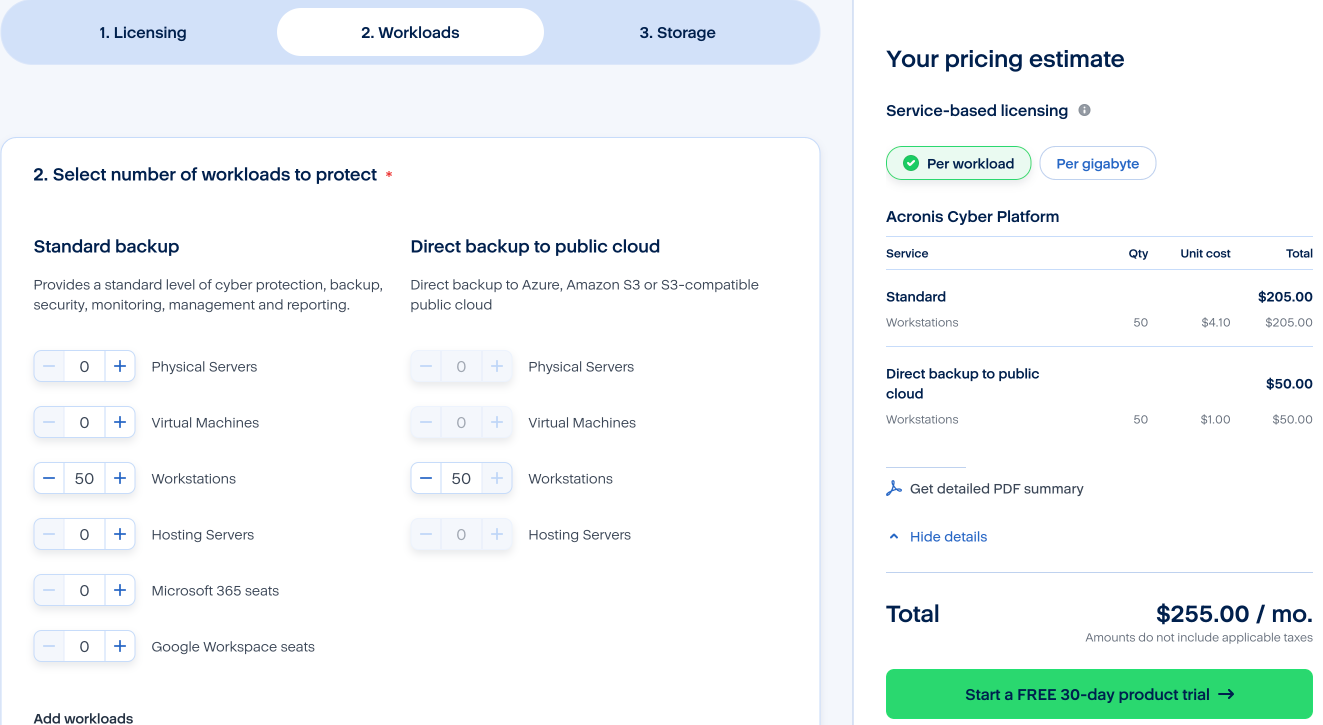
Note: The additional feature applies to the same 50 computers; it does not represent another 50 devices.
In this example, MSP360’s licensing cost is $144.86 per month lower, or approximately 56.8% less.
Cloud storage is charged separately in both cases. This comparison focuses on the cost of the selected backup scenario, rather than identical feature bundles: Acronis Standard also includes security, monitoring and management capabilities.
Pricing Comparison: Backup for Windows Server
For this case, we compared the monthly licensing cost of backing up 50 physical Windows servers directly to third-party public cloud storage, excluding storage charges.
MSP360
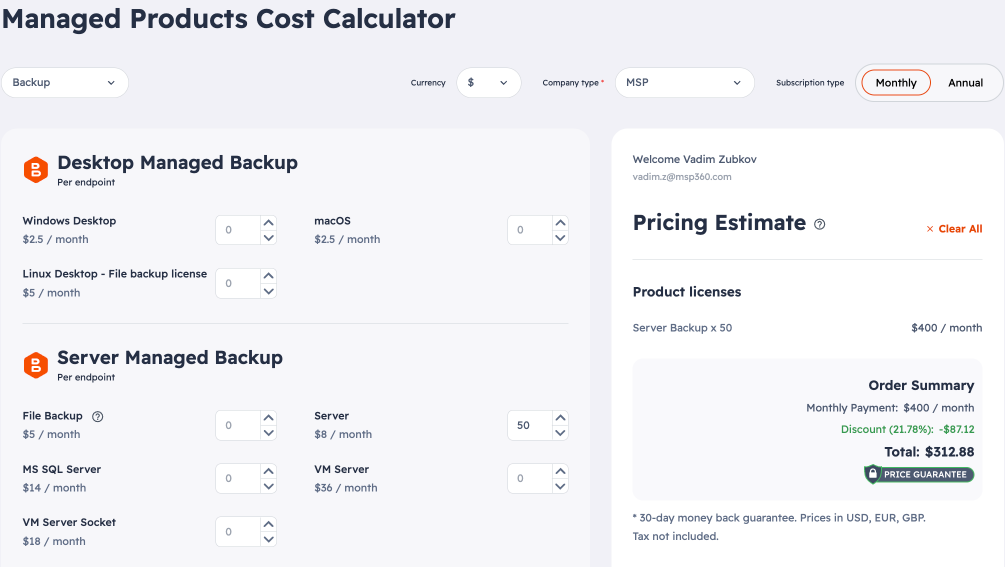
With MSP360 Managed Backup, 50 Windows Server backup licenses cost $312.88 per month, including the volume discount shown in the calculator.
Note: Direct backup to supported cloud storage is included without a separate add-on license.
Acronis
With Acronis, using service-based, per-workload licensing, the monthly cost is:
- 50 Standard Physical Server licenses at $25 each: $1,250
- Direct Backup to Public Cloud for the same 50 servers at $10 each: $500
That brings the total to $1,750 per month, plus cloud storage costs.
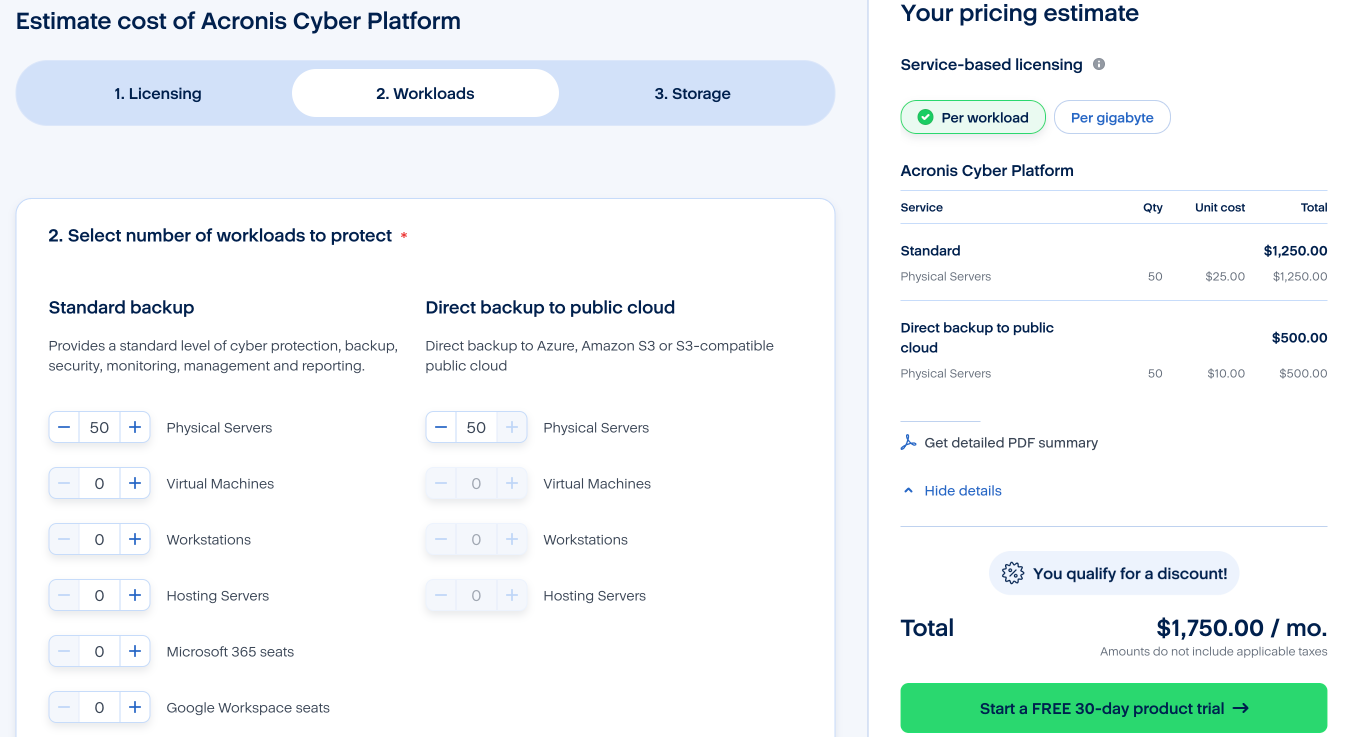
Note: The additional feature applies to the same 50 servers; it does not represent another 50 devices.
In this example, MSP360’s licensing cost is $1,437.12 per month lower, or approximately 82.1% less.
Cloud storage is charged separately in both cases. This comparison focuses on file-level and image-based backup for the selected Windows servers, rather than identical feature bundles: Acronis Standard also includes security, monitoring and management capabilities.
SaaS Backup for Microsoft 365 and Google Workspace
MSP360
If you want to back up your customers' Microsoft 365 or Google Workspace data to your own supported storage account, MSP360 Backup for Microsoft 365 and Google Workspace may be a good fit for you. Licenses for Microsoft 365 and Google Workspace backup are charged per user/month or year.
Additionally, you will need to have one additional license per domain to back up both SharePoint and Teams or Shared Drives for Google Workspace.
Note: If you add more users to a domain whose SharePoint and Teams data you are backing up, you will not need to purchase more licenses for this domain.
This can be beneficial if you only need to back up SharePoint and Teams for your customers or only want to back up certain employees' mailboxes and OneDrive.
Note: Storage will be an additional cost.
Acronis
You may already be protecting your customers' email with another solution. With Acronis, if you are licensing Microsoft 365 by workload[2] , active users with access to protected SharePoint or Teams resources count towards your protected seats. If they already have a cloud backup seat, they will not be charged for an additional seat just for having access to SharePoint or Teams. Acronis also offers a per-GB model where seats are not counted.
Pricing Comparison: Microsoft 365 and Google Workspace backup
Let's compare the cost of protecting 50 Microsoft 365 users, including SharePoint, using the selected calculator configurations.
| Monthly cost | MSP360 | Acronis |
|---|---|---|
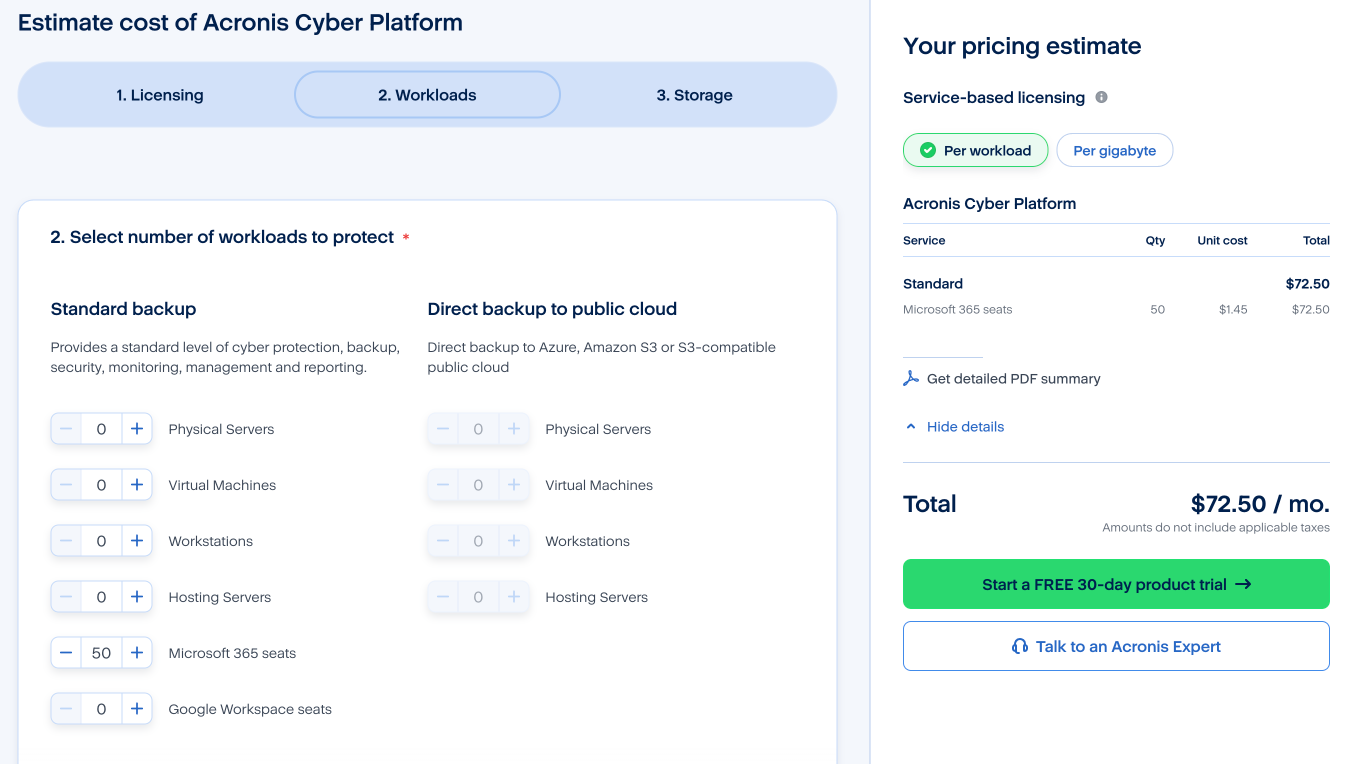
| User backup licenses | $51.22 | $72.50 (SharePoint included) |
| SharePoint/Teams license | $17.52 per domain | Included in selected licensing |
| Total licensing | $68.74 | $72.50 |
MSP360
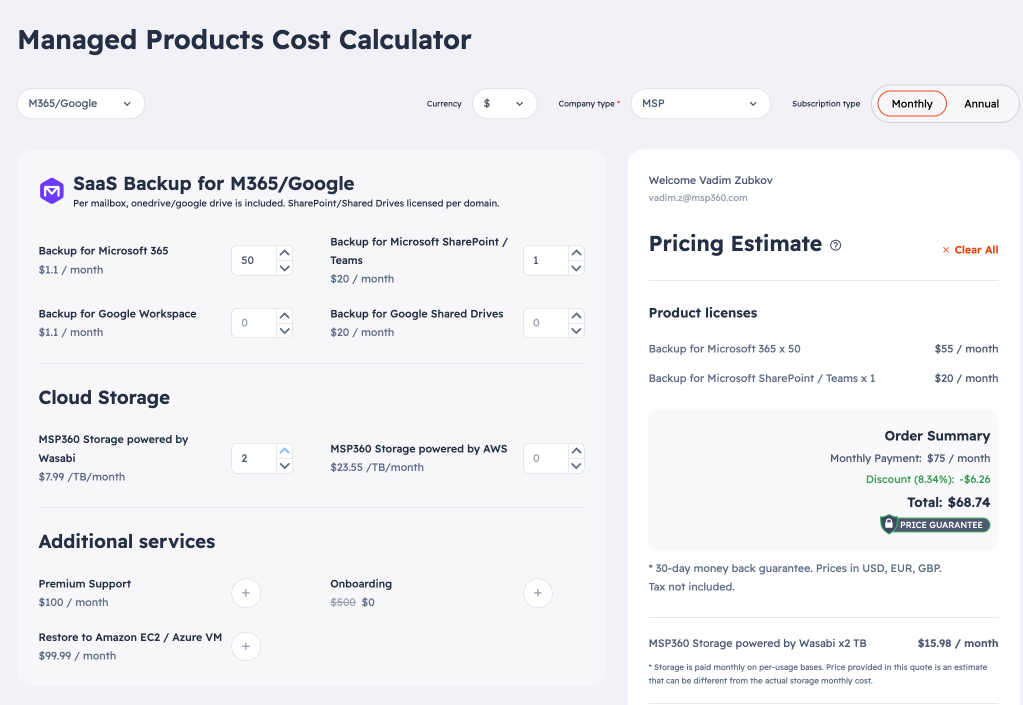
With MSP360, 50 Microsoft 365 backup licenses and one separate SharePoint/Teams license covering the entire domain cost $68.74 per month, plus third-party storage costs.
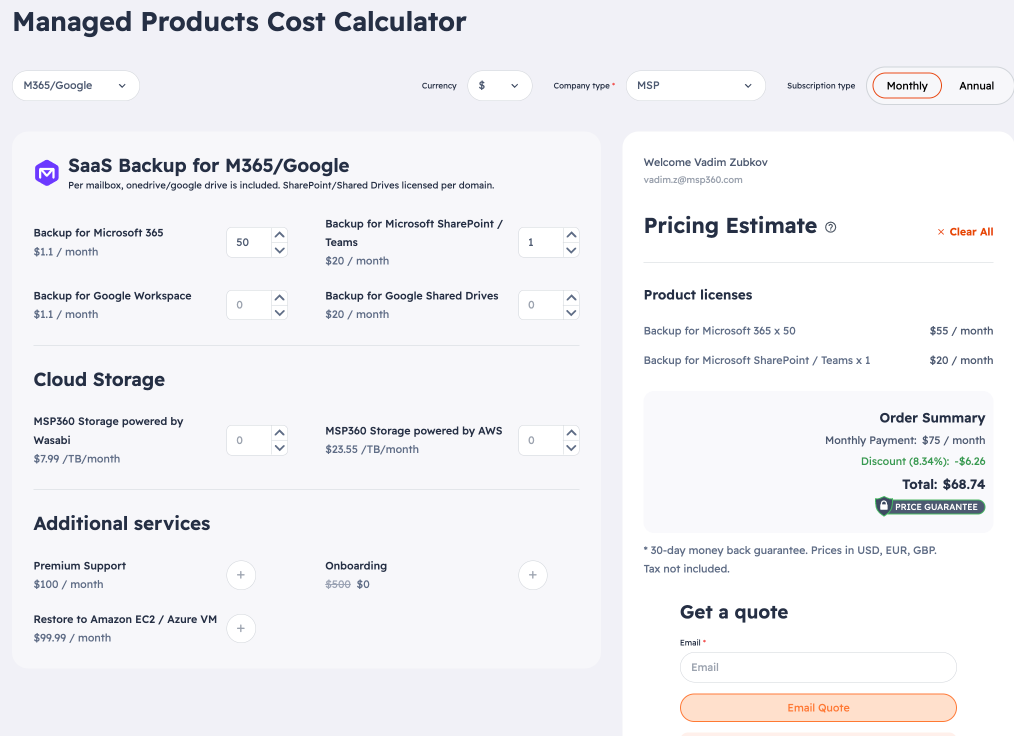
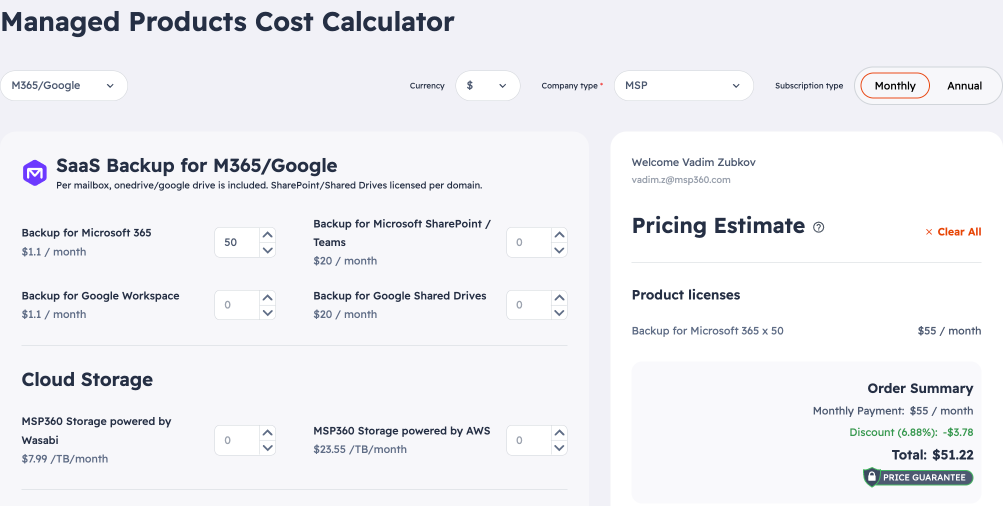
In this comparison, MSP360 offers a lower licensing cost with SharePoint/Teams included. If you don’t need SharePoint backup, you can leave out that license and reduce your licensing cost to $51.22 per month.
Acronis
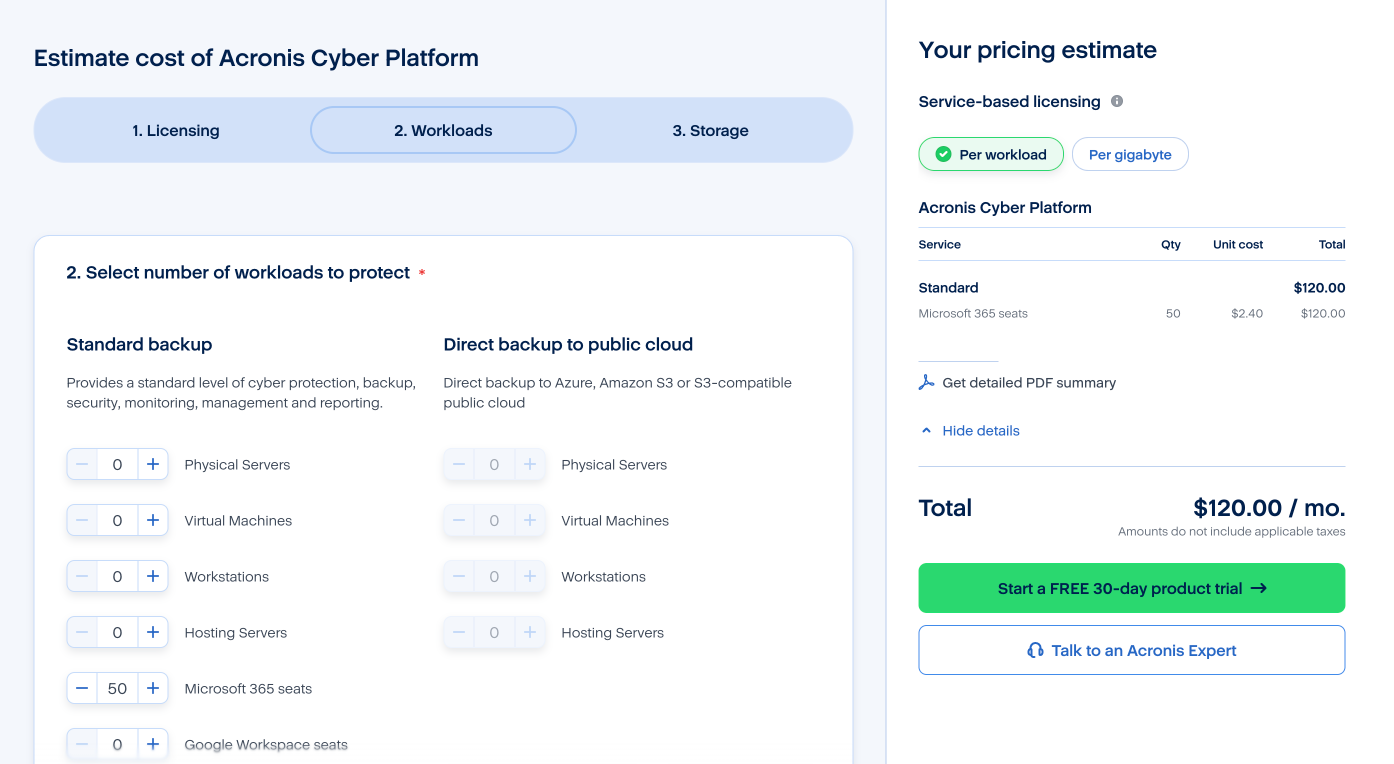
With Acronis, 50 Microsoft 365 backup licenses with SharePoint included cost $72.50 per month, plus storage costs.
Comparison with included storage costs
Now, let’s compare the total cost with storage. In this comparison case, we consider MSP360 storage powered by Wasabi.
With MSP360, the monthly cost is:
- 50 Microsoft 365 backup licenses: $51.22
- One SharePoint/Teams license covering the entire domain: $17.52
- 2 TB of MSP360 storage powered by Wasabi: $15.98
That brings the total to $84.72 per month, or $67.20 without SharePoint/Teams backup.
With Acronis, 50 Microsoft 365 backup licenses with SharePoint included and unlimited Acronis Cloud storage cost $120 per month in the selected USA configuration. Unlimited storage is subject to Acronis’s Fair Use Policy.
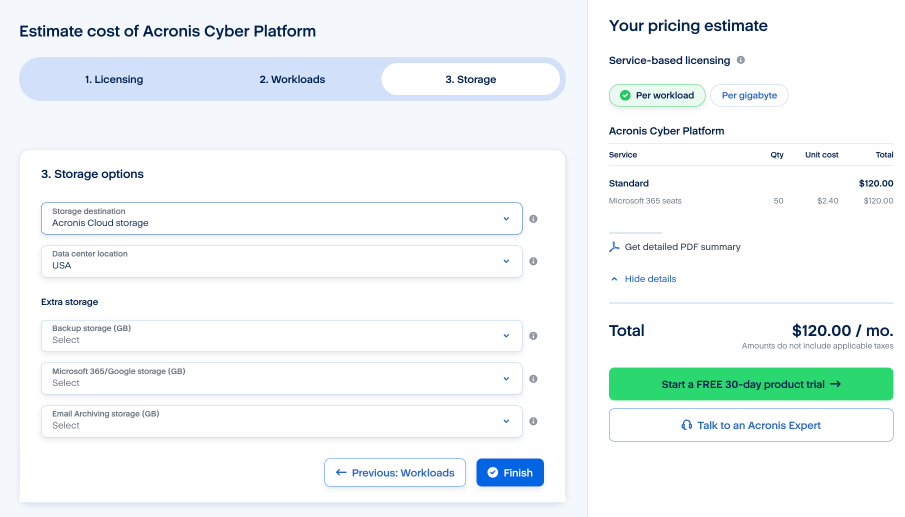
For this configuration, MSP360 with 2 TB of Wasabi storage costs 29.4% less, including SharePoint/Teams backup.
The savings also depend on how much backup storage you use. At $7.99 per TB per month, MSP360 plus Wasabi remains cheaper:
- At up to 6 TB with SharePoint/Teams backup: $116.68 per month at 6 TB.
- At up to 8 TB without SharePoint/Teams backup: $115.14 per month at 8 TB.
If your backup storage needs are modest, paying separately for licenses and storage can cost less than a package with unlimited storage. With MSP360, you can also leave out the SharePoint/Teams license when those workloads don’t need protection.
Prices reflect the calculator configurations and discounts shown and exclude taxes. Storage volumes refer to the space occupied by backups, including retained versions.
Note: The examples above use Microsoft 365. The same per-user backup license rates apply to Google Workspace in the selected configurations. SharePoint/Teams and Google Workspace Shared Drives are licensed separately by MSP360 on a per-domain basis.
All in One Platform for MSPs
MSP360
MSP360 combines MSP software like Managed Backup, Microsoft 365 and Google Workspace Backup, RMM, Managed Connect, and Tickets in one management console. MSPs can start with backup and add other services as their business grows.
MSP360 Tickets is included with Managed Backup and RMM at no additional cost. Tickets can be created automatically when a backup fails or becomes overdue and closed when the backup completes successfully. This helps technicians track backup issues without switching between tools.
For MSPs already using a PSA, MSP360 integrates with ConnectWise PSA and HaloPSA, allowing them to connect backup and RMM operations with their existing service desk workflows.
If you are a smaller MSP, you can also look into MSP360 RMM Community Edition. This will allow you to offer RMM and remote access to your customers for up to 50 endpoints at no cost. This edition is intended for MSPs managing external clients. You will still need to purchase backup licenses if you want to offer that service.
Acronis
Acronis brings together backup, cybersecurity, RMM, PSA and disaster recovery. Its PSA solution[3] goes beyond ticket management: technicians can track billable time, monitor SLAs and connect their work to customer contracts and invoices. Tickets can be created automatically from backup, security, RMM and disaster recovery alerts. This can be useful if you want to manage both technical services and the business side of your MSP within one platform.
Acronis PSA requires its own license, so its cost should be included when comparing platforms. Its broader functionality may be valuable if you need billing, contract management and time tracking alongside ticket management. If you only need to track backup and endpoint issues, or already use another PSA, consider whether these additional capabilities justify the extra cost.
Acronis vs. MSP360 - Which is Right for You?
MSP360 may be a better fit if you:
- Want to choose your own backup storage provider without paying for an additional direct-to-cloud feature.
- Prefer pay-as-you-go licensing without a long-term contract.
- Need to control backup and storage costs while maintaining flexibility in how you price services for customers.
- Want to manage backup, RMM, remote access, and tickets in one console, with the option to connect an existing PSA.
Acronis may be a better fit if you:
- Want to combine backup with a broader range of cybersecurity services.
- Need cloud-based disaster recovery with test failover and automated recovery workflows.
- Prefer Acronis-hosted storage and packaged services.
- Want integrated PSA functionality covering contracts, billing, and technician time tracking.
Conclusion
Both MSP360 and Acronis offer comprehensive backup capabilities, but their approaches to licensing, storage, and MSP management differ.
MSP360 stands out for its flexible storage options, straightforward licensing, and integration of backup with RMM, remote access, and ticketing. In the pricing scenarios examined above, MSP360 also offers substantial licensing savings, particularly for Windows workstations and servers.
Acronis brings a broader set of cybersecurity, PSA, and disaster recovery capabilities into one platform. This can make it attractive to MSPs looking to consolidate more services under a single vendor.
Ultimately, the right choice depends on your priorities: whether you value flexibility and control over backup costs or prefer a broader set of integrated services.
References