MSP360 Backup Supports Standard Infrequent Access Storage Class
The latest release of MSP360 Backup for Amazon S3 supports a new Amazon S3 storage class: Standard - Infrequent Access (Standard-IA).
This post applies to MSP360 Backup 4.4 and higher
On September 17 2015 Amazon released a lower-cost Amazon S3 storage class for data that is accessed less frequently. Amazon S3 Standard - Infrequent Access (Standard - IA) offers the high durability, low latency, and high throughput of Amazon S3 Standard, but with prices starting at $0.0125 per GB per month, $0.01 per GB retrieval fee, and a 30-day storage minimum.
The combination of low cost and high performance makes Standard - IA ideal for long-term file storage, backups, and disaster recovery.
Everything about backing up to Amazon S3: [hubspot type=cta portal=5442029 id=42c87c0e-f902-4164-8c10-fbf20dd99fdb]
How to set Standard-IA storage class with MSP360 Backup
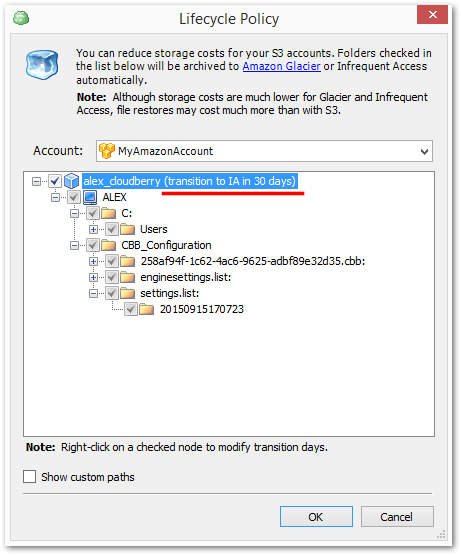
You can set Standard-IA storage class to your files in Amazon S3 bucket by using Lifecycle policy. To set up a new Lifecycle policy, just follow the instruction below:
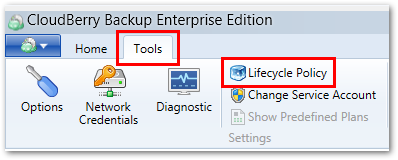
1 Run CloudBery Backup, go to Tools > Lifecycle Policy
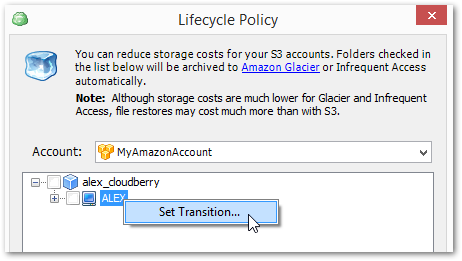
2 Select your Amazon S3 account from the "Account" drop-down menu, right-click on the storage bucket and hit Set Transition
3 Check the Infrequent Access storage class option and set the number of days to perform the transition to Standard-IA class
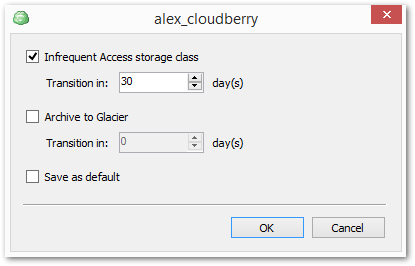
Note: The minimum number of days to transition to Standard-IA class is 30.
4 Selected files will be transited to Standard-IA storage class in accordance with the policy
Conclusion
MSP360 Backup provides the ability to set up Lifecycle policies that allow you to transit your files to Amazon S3 Standard-IA storage class! You can try the latest version of MSP360 Backup for Amazon S3 absolutely for free. Just download the 15-days fully functional trial version of the product and check if our backup solution meets your needs and requirements.