


With the new version of MSP360 Management Console we focused on removing friction from daily MSP operations while giving you more control where it matters most.
Here’s what’s new:
- Automatic software agents update
- QR code sign-in and 2FA
- Storage Usage report improvements
Automatic software agents update to the latest version
Keeping MSP360 Managed Backup, RMM, and Managed Connect software agents up to date no longer requires manual actions such as update monitoring, build creation, or distribution across target endpoints. With the recent update enabling this option ensures MSP360 software agents stay current automatically - without extra clicks or ongoing monitoring.
To enable automatic software updates, navigate to Options in the Downloads section of the main menu and enable the Allow auto-generate and Allow auto-update settings.
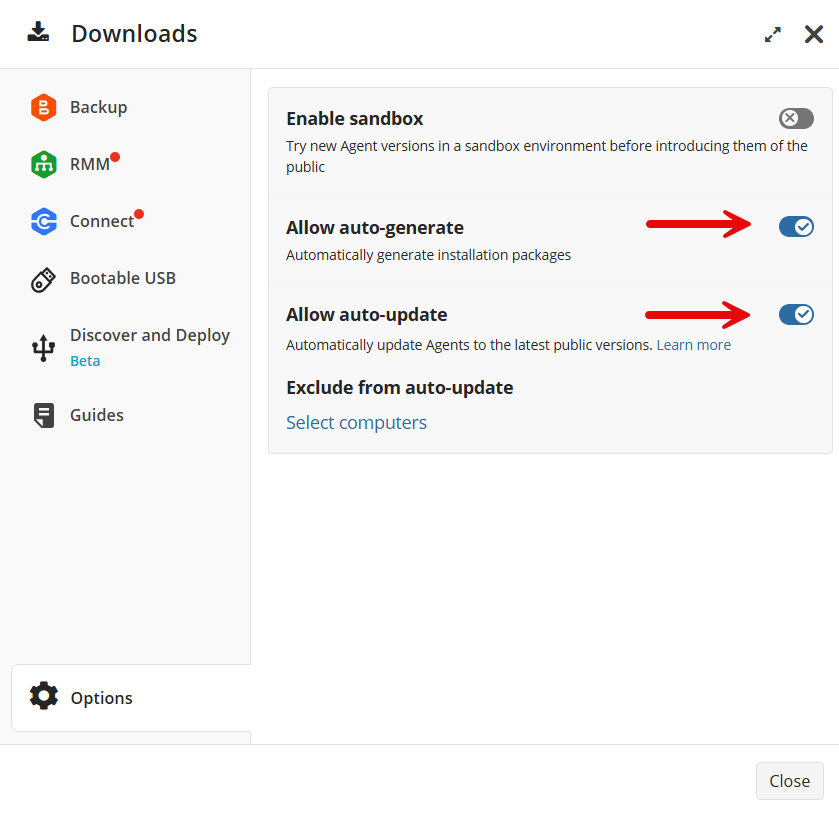
Note: When the Enable sandbox setting is turned on, making a new build public still requires manual action. For a fully seamless auto-update experience, Enable sandbox should be turned off.
Exclude critical servers and workstations from auto-update
Mission‑critical servers and regulated environments often require approval before any software change. Alongside the global auto-update feature, we introduce the option to exclude specific endpoints from automatic updates - allowing MSPs to strike the right balance between automation and control.
MSPs can select the computers they want to exclude from the same Options section in the Downloads slide-in control panel.
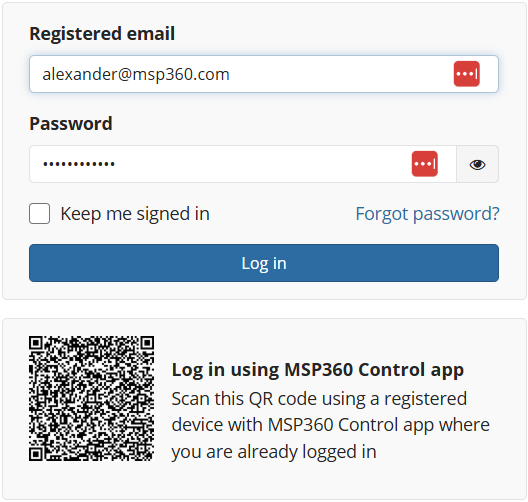
QR code sign-in and 2FA confirmation with MSP360 Control app
Traditional 2FA flows interrupt workflows and slow down frequent sign‑ins and critical actions confirmation. With the new release we have introduced quick 2FA confirmation with the MSP360 Control mobile application using QR code.
Storage Usage report improvements
MSPs providing backup to multiple customers sometimes struggle to identify stale data, ex-customer data or storage destinations with excessive storage consumption - leading to unnecessary storage costs. In the previous updates of the Storage Usage report we added a grouped by “Company” view. With the new version we have added a grouped by “Storage destination” view allowing to view storage consumption by storage destination.
You can access Storage Usage report from the “Reporting” menu in the MSP360 management console main menu.
Conclusion
The new update of MSP software makes everyday MSP workflows simpler, safer, and more predictable - from hands-off agent updates to precise control over critical systems and clearer insight into storage costs.
If you’re already using MSP360, you can start taking advantage of these improvements today by updating your settings in the console. If you’re considering the MSP360 solution for MSPs, you can sign up here.
As always, we’d love to hear your feedback - let us know how these updates fit into your workflows on the MSP360 forum.