

We’re excited to announce the latest release of MSP360 Managed Backup, featuring major updates to the Storage Usage report, more advanced audit log notifications, enhanced login security, and easy access to documentation directly within the console.
Storage Usage Report Updates
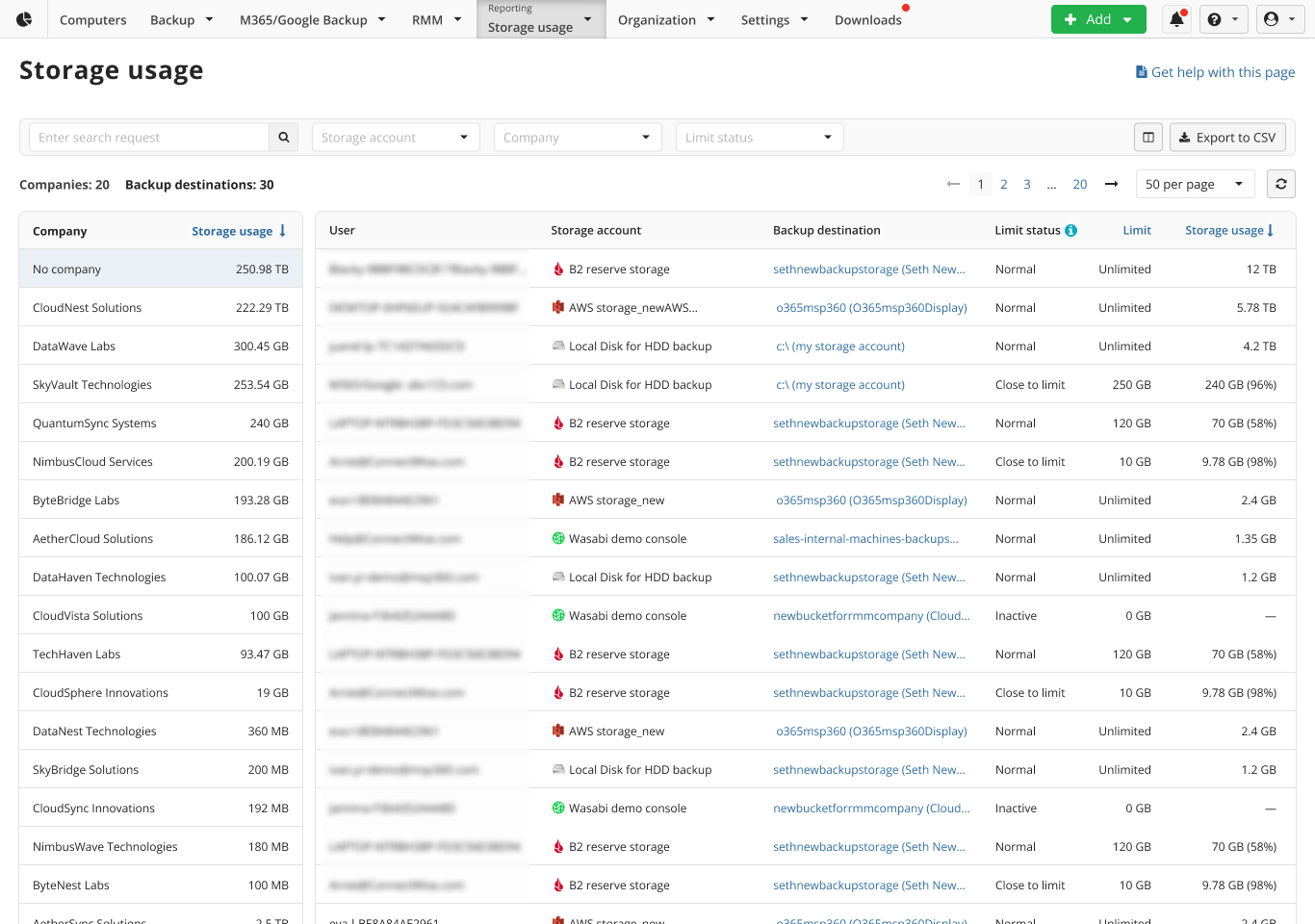
With this release, we’re introducing a fully reworked interface for the storage usage report, designed to give you a clearer and more efficient way to track consumed storage at the company level. With this update, you can see how much storage each company uses, helping you understand overall consumption patterns and identify where optimization may be needed. You can now customize the report to list each company’s storage account, total storage used (in GB and %), and sort by destinations.
To make it easier to drill down into specific datasets, we’ve added new filters: now you can sort data by storage accounts and companies, with multi-selection support. This update marks a significant step toward simplified, more efficient storage management and optimized billing procedures.
Notifications for Events from Audit Log
In MSP360 Managed Backup 8.8, we’ve added the ability to configure notifications for specific audit log events, enhancing security and giving users greater monitoring capabilities. Notifications can now be enabled for any event, including but not limited to
- User deleted: Track this event to prevent accidental removals or detect unauthorized actions.
- Backup agent uninstalled: Monitor potential misconfigurations. Note that this notification does not apply to regular backup agent updates.
- Storage account added: Ensure that newly connected storage accounts comply with your internal policies and documentation.
- Storage account deleted: Detect any unauthorized storage account deletions.
- New administrator created: Gain visibility into changes in administrative access.
- Administrator deleted: Track accidental or unwanted administrator deletions.
- Data deletion from backup storage triggered: Monitor this event to prevent potential data loss.
To enable notifications, go to the Organization tab, open the Audit Log section, and click the email icon in the Notifications column for the desired event. You can add multiple recipients for each notification.
Enforce Google or Azure SSO for Sub-Administrators
With this release, we’ve introduced an option to enforce Google or Azure SSO for sub-administrators, enhancing security and streamlining access management. If you need to standardize login procedures across all sub-administrators, you can enable this enforcement at the global level.
When a sub-administrator attempts to sign in using regular credentials, the system will block the login and prompt them to authenticate via SSO instead.
Useful Documentation Available in the Downloads Panel
Now you can access helpful guides on getting started with MSP360 and other materials that highlight product best practices directly from the Downloads panel. Whether you need them for personal use or to build your own knowledge base, you can instantly download the required documents in PDF format without the need to contact your account manager or manually copy information from the website or help section.
We value your feedback and encourage you to share your thoughts on our forum, feedback portal, or via the contact form.