

Setting up a restore shouldn’t require digging through settings or remembering how everything was configured.
With the latest update to MSP360 Managed Backup, we’ve introduced a Restore Wizard that walks you through the process step by step. The goal is simple: make restore configuration easier and more predictable, especially in situations where time and clarity matter.
Summary
The Restore Wizard guides you through the key steps of configuring a restore — from selecting the backup plan to choosing the restore point and destination.
It doesn’t change how restores work under the hood, but it makes the setup process clearer and easier to follow.
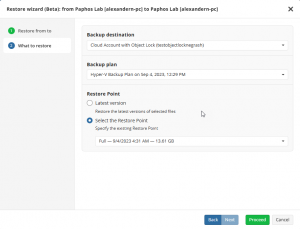
What is the Restore Wizard in MSP360 Managed Backup
At a high level, the Restore Wizard provides a guided way to configure restores in MSP360 Managed Backup.
Previously, restore setup depended on preconfigured restore plans and required a good understanding of how those plans were structured. That approach worked, but it could be confusing — especially in less common scenarios, like restoring data to a different machine.
The wizard simplifies this by bringing all the key decisions into a single flow, so you can configure a restore step by step without needing to piece things together.

Available on the Computers page in the top right corner.
How restores worked before
Before this update, restores were typically performed using preconfigured restore plans or through the Backup Storage view.
This approach offered flexibility, but it also meant users needed to understand how restore plans were set up and how different options interacted. In more complex cases, that could slow things down or lead to uncertainty during configuration.
The Restore Wizard doesn’t replace that functionality — it just provides a more straightforward way to go through the same process.
Practical Use Cases of Restore Wizard
The best way to understand the value of Generic Restore Wizard is to look at the restore scenarios it helps support in practice.
1. Restore to the source computer
When you need to recover a specific file or folder, the wizard helps you go through the process step by step without having to think about how the restore plan is structured.
2. Restore to a local computer
If the original machine isn’t available, you can configure a restore to another local machine through the same guided flow, without switching between different parts of the interface..
Current limitations
At the moment, restores through the wizard are available to the original or local computers running Windows OS.
Support for restoring to other machines is planned for future updates.
Final thoughts on our Generic Restore Wizard
The Restore Wizard is a small but practical change. It doesn’t introduce new restore capabilities, but it makes existing ones easier to use.
For MSPs and IT teams, that means less time figuring out configuration details and a more predictable restore setup process — especially in situations that don’t come up every day.