

MSP360 has introduced the RMM Community Edition for businesses looking to acquire affordable tools for remote monitoring and management (RMM). Recognizing this hurdle, MSP360 has introduced the RMM Community Edition, a fully-featured RMM solution offered at no cost specifically for MSPs.
This free edition provides professional-grade RMM capabilities to help new and small MSPs monitor and manage client systems without upfront investment. In this article, we explore what MSP360 RMM Community Edition is, its key features and benefits, and how it empowers early-stage MSPs to deliver quality IT services from day one.
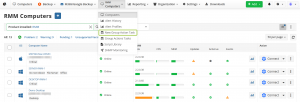
#MSP360 RMM Interface
MSP360 Free RMM Community Edition
MSP360 Free RMM Community Edition is a no-cost version of MSP360’s remote monitoring and management platform designed exclusively for managed service providers. Unlike limited trials, this Community Edition includes the full core feature set of MSP360 RMM with no feature restrictions or time limits.
MSPs can manage up to 50 endpoints at no cost, with the ability to invite unlimited administrators on their team to the platform. In other words, the free edition provides the same powerful toolset as the paid RMM plans, only capped by the number of devices it can monitor. There are no hidden fees, contracts, or credit card requirements – it truly is free RMM software that never expires.
This Community Edition was created to help early-stage MSPs launch their business and serve their first clients without financial barriers. New MSPs often struggle to afford premium RMM tools, so MSP360’s free edition bridges that gap by offering a complete RMM solution at zero cost. It’s important to note that RMM Community Edition is intended for external client management (MSPs), not for internal corporate IT departments.
The platform is purpose-built for MSP use cases – making it an ideal entry point for new or small service providers who need professional monitoring and management capabilities on a startup budget.
Key Features and Capabilities of RMM Community Edition
What do you actually get with MSP360’s free RMM? Despite being free, the Community Edition is fully featured. It provides the full power of MSP360’s RMM platform, meaning you have access to all the essential RMM functions to support your clients. Here are the major features included:
- System Health Monitoring: Real-time monitoring and alerting of client machines’ vital signs – CPU, memory, disk usage, etc. – with a centralized dashboard for performance and status checks. This helps you catch issues early by keeping an eye on system metrics and health indicators across all managed endpoints.
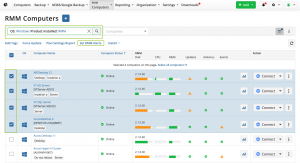
#System Health
- Patch Management: Automated operating system and software updates to keep client devices secure and up-to-date. You can schedule and deploy patches remotely, ensuring that all managed computers receive critical updates without manual intervention – a huge time saver for any MSP. Learn more about RMM patch management.
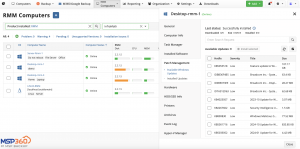
#Patch Management
- Software Deployment: Ability to remotely deploy software applications across multiple endpoints efficiently. Whether onboarding a new client or rolling out tools to dozens of machines, you can push installations from the RMM console instead of touching each device.
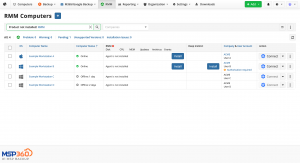
#Deployment
- Remote Access and Support: Built-in secure remote access tools (leveraging MSP360 Connect) to troubleshoot client systems from afar. If an issue arises on a client’s computer, you or your technicians can remotely connect to resolve it without needing an on-site visit.
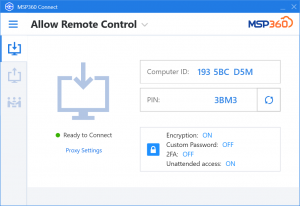
#MSP360 Connect Interface
- Alerting and Notifications: Customizable alerts for critical events and thresholds on client machines. The system can notify you of issues like high resource usage, failed updates, or offline status, enabling prompt response to minimize downtime.
- Cross-Platform Compatibility: Support for managing Windows, macOS, and Linux endpoints under one RMM platform. This flexibility is crucial for MSPs who might service diverse environments – you can monitor all client devices regardless of operating system.
- Unlimited Administrators: No user seat limits – you can add as many team members (technicians, admins) to the RMM platform as needed. This encourages collaboration in your team without worrying about licensing each admin.
All these features come with no functional restrictions in the free edition. In essence, MSP360 RMM Community Edition gives you every core RMM capability “out of the box” at zero cost. It’s comparable to having a professional RMM suite that typically costs hundreds per month, but free for smaller-scale usage.

Benefits for New and Small MSPs
For MSP startups or small providers, the benefits of adopting the Community Edition are significant:
-
- Zero-Cost Entry: The obvious benefit is cost. Being able to leverage a professional RMM tool without any subscription or licensing fees removes a huge financial barrier. You can start managing up to 50 devices with no upfront investment, which is perfect when you have only a few clients or are just building your customer base.
- Full RMM Toolset from Day One: Unlike “light” free tools, MSP360’s offering doesn’t strip away critical features. You aren’t forced to compromise on capabilities despite not paying. Monitoring, patching, remote support, etc., are all there. This means you can deliver professional-quality service to your clients from day one, helping you compete with larger MSPs and impress early customers. This complete toolset is part of the overall MSP software platform.
- No Time Pressure or Trial Expiry: Since the free RMM isn’t a time-limited trial, you won’t face a sudden loss of functionality after 14 or 30 days. Use the Community Edition indefinitely as long as it fits your needs. This reduces pressure on a new MSP to generate immediate revenue just to afford critical software. You can grow at your own pace while relying on the free toolset.
- Scales with Your Business (Up to 50 Endpoints): The Community Edition is suitable for MSPs managing up to 50 endpoints, which covers many small MSPs’ entire client portfolio in the early stages. Fifty endpoints free is a generous limit – it could be, for example, 5 clients with 10 workstations each. This allows you to support several clients fully before ever needing to upgrade. When you do approach 50+ devices, it’s a sign your MSP business is scaling – at which point the tool has already proven its value in helping you grow.
- Upgrade Path When Needed: When your business growth requires managing more than 50 endpoints, MSP360 offers a seamless upgrade to the paid RMM plans. The transition does not require re-deployment; you simply unlock additional capacity and advanced features (like support for unlimited devices, 24/7 support, etc.) by moving to a paid tier. In other words, the free edition can be viewed as a springboard – it supports your initial growth, and when you’re ready to expand further, you can upgrade without disruption to your operations.
- Community and Documentation Support: While the free edition comes with community-based support (forums, documentation) rather than dedicated phone support, MSP360 provides plenty of resources to help you succeed. The knowledge base, user guides, and a script library can assist in troubleshooting or automating tasks as you learn the platform. This self-help approach is often sufficient for smaller environments, and it’s cost-effective.
Who Should Use RMM Community Edition?
MSP360 RMM Community Edition is tailored for a specific audience: MSPs managing external clients. The platform’s feature set and license terms are aligned with the needs of service providers, not in-house IT departments. Here’s the intended audience at a glance:
-
- New and Emerging MSPs: If you’re just starting your MSP business or in the early growth stage, the Community Edition was built for you. It’s described as “the perfect choice for early-stage MSPs” because it removes cost obstacles while giving you the tools to succeed. You can establish professional IT management practices from the start without worrying about software budgets.
- Small MSPs with Modest Client Bases: Perhaps you have a handful of clients or under 50 total endpoints under management – this free RMM will cover your needs. It’s ideal for MSPs serving small businesses, where the endpoint count is limited. Instead of paying for an RMM that far exceeds your scale, you can use Community Edition until your client roster grows.
- MSPs on a Tight Budget: Any service provider looking to minimize operational costs will benefit. Since there’s no contract or recurring fee, you can maintain your RMM capabilities even during lean periods. This could also appeal to MSPs in developing markets or those recovering costs from a startup phase
- Those Evaluating RMM Solutions: Even if you plan to eventually go with a paid RMM, the free edition serves as a great evaluation tool for MSP360’s platform. You can thoroughly test its features with real clients and data. If it suits your business, you may then opt to upgrade for more endpoints rather than migrating to a different RMM vendor.
On the other hand, who is not the target? Primarily, internal IT teams (e.g. an IT department managing company-owned computers) are not the focus for Community Edition. The licensing is tied to MSP businesses (often requiring a business account signup as an MSP).
Enterprises or IT admins looking after internal infrastructure should consider MSP360’s other solutions or the paid RMM, as Community Edition is positioned as an MSP-only offering.
Why MSP360 Made It Free (No-Cost, No Catch)
It’s natural to be skeptical of “free” software in the IT world, but MSP360’s approach with RMM Community Edition is about building goodwill and supporting the MSP community. The rationale includes:
-
- Lowering Barriers for MSP Startups: Many capable technicians hesitate to start an MSP or struggle early on because the cost of professional software (for RMM, backup, etc.) is prohibitive. By offering its RMM tool at no cost for up to 50 devices, MSP360 eliminates that financial barrier. This encourages more IT entrepreneurs to enter the MSP space and grow their businesses, which in the long term grows the market for MSP360 as well.
- Building Trust and Brand Loyalty: Providing a genuinely useful free solution with no catch helps position MSP360 as a supportive partner for MSPs. If you start your business on their free RMM and find success, you’re likely to trust their brand and consider their other products. For example, their comprehensive managed backup options, including robust cloud backup offerings and specialized SaaS backup for platforms like Microsoft 365 (which includes specific features like OneDrive Backup) and Google Workspace.
- Community Edition vs. Trial – Ongoing Engagement: Unlike a trial that ends after a short period, a community edition keeps potential customers engaged with the platform long-term. Even if you’re not paying initially, you are using MSP360’s ecosystem. Over time, as your needs grow, the hope is you’ll convert to a paying customer rather than switching to a competitor. Meanwhile, you’ve benefited from a free solution with no expiration. There truly is no catch – other than the 50-endpoint usage cap, which is clearly stated upfront. You can also explore options for free backup software to complement the RMM tool.
- “Free” Does Not Mean “Unsupported” or “Basic”: MSP360 has made it clear that the free RMM is a fully functional offering, not crippleware. They explicitly highlight “no hidden fees, no contracts, no credit card required, and no expiration date”. It’s a strategic move to earn trust. MSPs can adopt the tool without wariness of a bait-and-switch. The only limitations are those inherent to keeping it an entry-level solution (endpoint count and community support). Other than that, MSPs can use it to truly run their operations and not feel pressured to upgrade unless their business growth justifies it..
Getting Started with RMM Community Edition
If you’re interested in trying MSP360 RMM Community Edition, getting started is straightforward. You simply need to sign up for an MSP360 account as an MSP (if you don’t already have one) and enable the RMM Community Edition from the MSP360 management console. From there:
- Deploy RMM Agents: Install the MSP360 RMM agent on each client machine you want to monitor. The agent supports Windows, macOS, and Linux, so you can deploy it across various client environments. The console provides a download link or script for easy installation on remote endpoints.
- Configure Monitoring and Policies: Once agents report in, you’ll see all endpoints listed in the RMM dashboard. You can then set up health checks, define alert triggers (for example, CPU usage thresholds or low disk space warnings), and establish patch management schedules according to each client’s maintenance windows. The Community Edition includes a robust alerting system and patch management policy settings to tailor how and when updates occur.
- Leverage Remote Access: For any troubleshooting needs, use the integrated remote access (MSP360 Connect, included free with RMM) to remote into client desktops or servers. This enables you to resolve issues in real time. Ensure you have permission from clients for remote support and that you follow security best practices (the platform supports role-based access and two-factor authentication for techs, if needed).
- Expand as Needed: Keep an eye on your endpoint count. As you approach the 50-endpoint limit, you can plan to upgrade to a paid plan. The system will notify you if you reach the free limit. Upgrading simply involves choosing a plan that supports more devices; your agents and configurations remain intact. Until then, enjoy the full functionality for free.
Throughout this process, MSP360 provides online documentation and a community forum where you can ask questions. New MSP users are encouraged to read the Quick Start Guide (offered for download on the RMM Community Edition page) which provides detailed steps for setup and best practices.
If you prefer a visual, step-by-step explanation of the interface and core workflows, this video provides a clear overview of MSP360 RMM Community Edition in action.
Conclusion
MSP360 RMM Community Edition is a game-changer for up-and-coming MSPs. It removes the cost barrier to obtaining a high-quality RMM solution, allowing you to focus on building your business and delivering great service instead of worrying about software expenses.
With comprehensive features – from system monitoring and patching to remote support – it equips you to meet clients’ needs effectively while operating lean.
If you’re an MSP just starting out or running a small-scale operation, taking advantage of this free RMM platform can boost your efficiency and credibility.
You can provide proactive maintenance, rapid support, and automation for your clients right from the outset, which helps in client retention and growth.
Ready to empower your MSP business with a free RMM tool? Try MSP360 RMM Community Edition today.
Sign up for the free edition and deploy it in your environment to see the benefits firsthand – no credit card or commitment required. With MSP360’s Community Edition, you have nothing to lose and a powerful RMM solution to gain.
Start managing your clients’ IT systems at no cost, and position your MSP for success from day one. Get started now with MSP360 RMM Community Edition and take the first step toward scalable growth in your MSP journey!