
SaaS Backup for Microsoft 365 and Google Workspace
MSP360 Backup for Microsoft 365 and Google Workspace is offered as a SaaS Backup solution to protect all core Microsoft 365 and Google Workspace components.




SaaS Backup Solution with MSP360

Microsoft 365/Google Workspace backup support in one platform

Cloud-to-cloud data protection

Flexible licensing and cost-effective backup solution

Reports and notifications
Understanding Microsoft’s Shared Responsibility Model
- M365 Infrastructure uptimeMaximum uptime for the infrastructure and software hosting Microsoft 365
- Data replicationData is replicated across multiple locations which doesn’t save from manual file deletion
- Access controlAvailable access controls include basic password-based authentication and multi-factor authentication
- Physical accessProtection against unauthorized access to the physical infrastructure
- Setup and managementMicrosoft configures and manages the infrastructure that hosts Microsoft 365
- M365 Data AvailabilityThe data availability and access to it is the M365 user’s responsibility
- Data retentionData should be retained for the periods specified by the business need, applicable laws or internal company policies
- Internal attacksA malicious employee could deliberately delete data
- Virtual/Digital accessProtection against a third party that gains access to your Microsoft 365 resources could encrypt it and hold it for ransom as part of a ransomware attack
- Regulatory complianceThe M365 user should store sensitive data in ways that comply with regulatory policies governing that data
Why MSP360 Backup for Microsoft 365 and Google Workspace?
MSP360 offers a SaaS Backup solution that ensures secure cloud to cloud data protection and quick recovery of essential Microsoft 365 and Google Workspace components without needing local infrastructure.
Microsoft 365 backup
Google Workspace backup
OneDrive backup
Google Drive backup
Outook backup
Gmail backup
SharePoint backup
Shared Drives backup
Microsoft Teams backup
Contacts and Calendars backup
Backup your Microsoft 365 and Google Workspace with MSP360
Backup for M365/Google
- Backup for M365 and Google Workspace
- Bring-Your-Own Storage
- Backup History
- Role-based access control
- Advanced encryption
- Item level backup and restore
- No hidden payments
- Reporting
- Retention Policy
- Audit Log
- Multi-factor authentication
- Group management operations
- Export to PST
- Email Notifications
- Support: Email support
SaaS Backup Solution Features
MSP360 has a dedicated SaaS Backup solution that offers complete and flexible protection capabilities for MSPs, businesses, and individuals. Some advanced features are available exclusively through the MSP360 Managed Backup for M365/Google, an integrated solution within the MSP Platform, designed specifically for MSP use.
Cloud-to-Cloud Backup
Flexible and Cost-Effective SharePoint Licensing
Cloud Storage of Your Choice
Quick Access and Restoration from Anywhere
Export Files to PST
Robust Retention Policies
Centralized Management
Local Backup
MSP Platform
MSP360 Managed Backup for M365/Google is part of the MSP Platform.
MSP Platform is a solution designed for MSPs to centralize management of backup (including Microsoft 365 and Google Workspace), RMM, and remote access in a single console.
MSP Platform Features
- Multi-Tenant Backup
- Advanced Reporting and Alerting
- Centralized Management
- Grouping Domains by Companies
- MSP360 Storage Powered by AWS or Wasabi
- Rebranding
- Support: 24/7/365 live technical support
Getting Started with MSP360 Backup for M365 / Google
Find how to set up and configure the SaaS Backup solution with the MSP360 comprehensive getting-started guide, designed to help you protect your data quickly and efficiently.
MSP360 Backup for Microsoft 365 and Google Workspace Overview

Product Interface
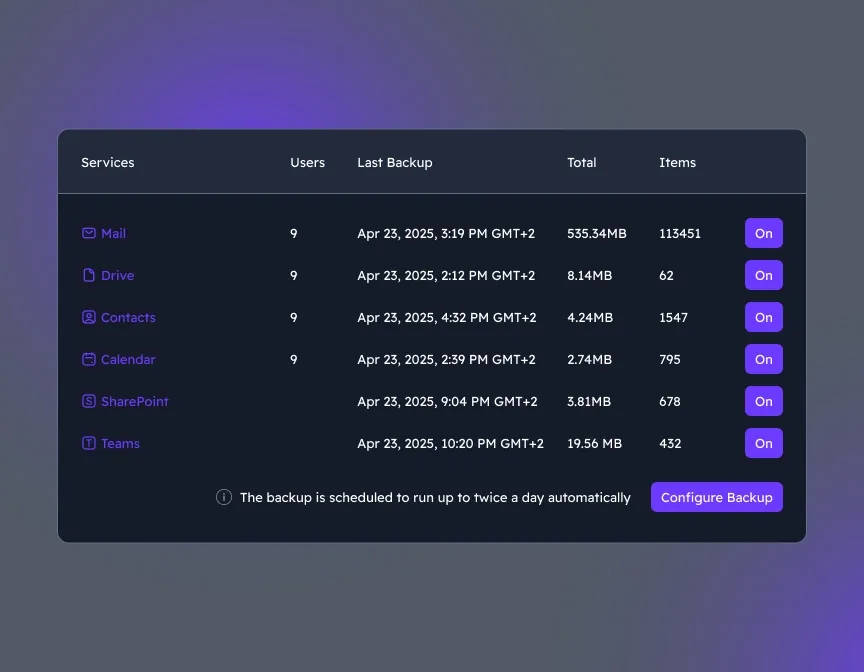
Choose components to back up
Once you are logged in, the Microsoft 365 or Google Workspace Backup dashboard is accessed, where you can select and manage all necessary components.
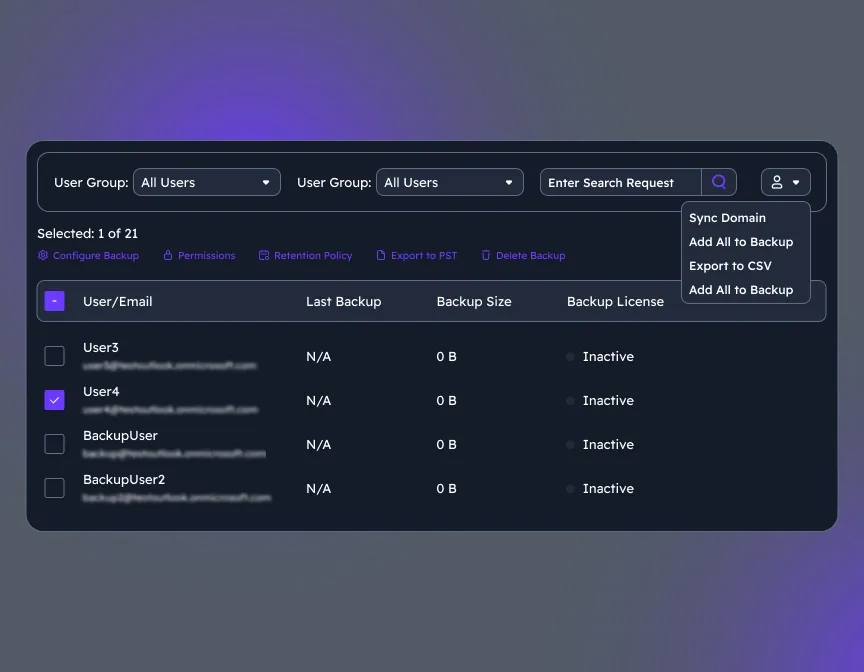
Manage Users
Add and manage new users/groups to the users' grid and synchronize changes for existing users.
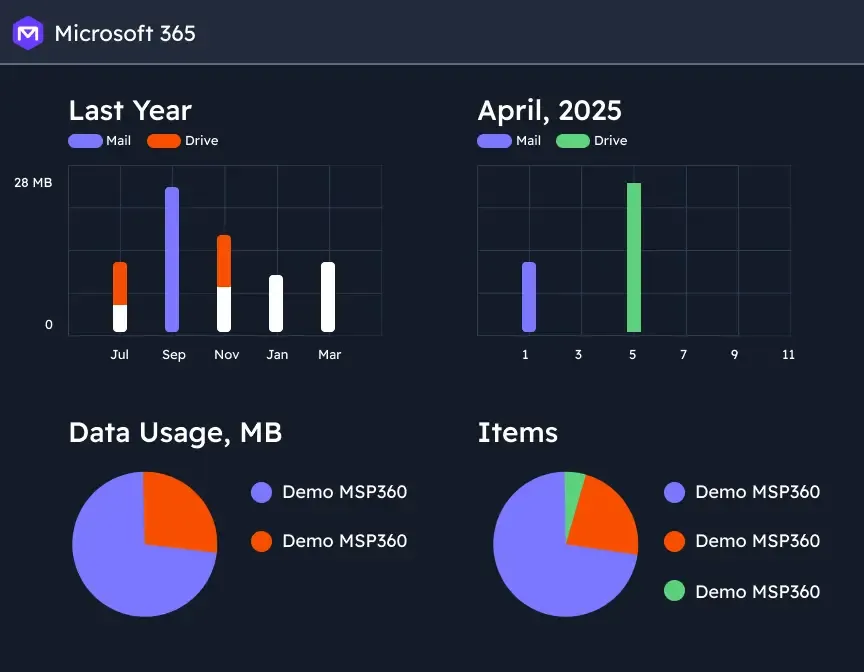
Analyze Backup Reports and Insights
Backup statistics give you clear visibility into usage, success rates, and storage trends, helping you stay audit-ready, optimize retention, and plan ahead with confidence.
SaaS Backup Solution with MSP360
Cloud-to-cloud data protection and quick recovery for Microsoft 365 and Google Workspace, with simple setup and maintenance.

MSP360 Backup for M365 / Google in Review
















SaaS Backup Solution FAQ
What is SaaS Backup?
Why do I need to back up Microsoft 365 and Google Workspace data?
How does licensing work for M365/Google Backup?
How secure are MSP360 backup solutions?
- Encryption in transit and at rest
- Immutable backups to prevent accidental or malicious changes
- Access controls & audit logs to track all backup and restore activities
Does MSP360 provide customizable reporting?
What is the difference between SaaS Backup and Managed SaaS backup solutions?
Resources Related to MSP360 Backup for M365/Google
Visit our Resource Center to explore valuable resources on backup and security best practices.
Best 23 Backup Solutions for Microsoft 365
Why You Need to backup Microsoft 365 and How MSP360 Helps
Top 12 Methods on How to Backup Outlook Emails
19 Best Google Workspace Backup Solutions
How to prevent ransomware in Microsoft 365
Microsoft 365 Backup Solution: Native vs third party backup software
Guide on How to Backup Microsoft 365 OneDrive
How to Back Up SharePoint: A Complete Guide for IT Admins and MSPs
SaaS Backup Solution with MSP360
Cloud-to-cloud data protection and quick recovery for Microsoft 365 and Google Workspace, with simple setup and maintenance.