MSP360 Backup

Mac Backup Software

Protect files and folders on your Mac with scheduled backups to local storage or your preferred cloud provider. Recover the files you need on supported Intel and Apple silicon Macs.


g2-leader-summer-2026
g2-high-performer-summer-2026
info-tech-champion-2026
front-runners-2026
capterra-shortlist-2026
Mac Backup Software
Why Choose MSP360 Mac Backup Software?

Why Choose MSP360 Mac Backup Software?

MSP360 backs up files and folders on Intel and Apple Silicon Macs to the supported cloud or local storage of your choice, no vendor lock-in. Pro and Managed Backup support AES encryption up to 256-bit, while Managed Backup adds centralized management for Mac endpoints.

MSP360 Mac Backup Software Features

MSP360 gives you the essentials for protecting Mac data, file-level backup and flexible storage, with encryption and advanced protection available in Pro and Managed Backup.

Intel and Apple silicon support

MSP360 Backup supports both Intel-based and Apple silicon Macs. Intel Macs are supported on macOS 10.12 Sierra and later, while Apple silicon Macs require macOS 13 Ventura or later.

File and folder restore

Restore individual files and folders from your backups whenever you need them. Browse your backup history, pick a specific version of a file, and recover it to its original location or a new one.
Pro
Managed

Scheduled Incremental backups

After the initial full backup, subsequent incremental runs capture files that have changed since the previous backup, helping reduce repeated data transfer. MSP360 lets you configure separate schedules for full and incremental backups to match your backup routine.
Pro
Managed

Encrypted backups

MSP360 Backup supports AES encryption with key sizes of 128, 192 and 256 bits, to help you protect your data.

Protect backup copies with Object Lock

With object lock (immutability) enabled, backup copies can't be modified or deleted until the configured retention period expires, protecting your data from ransomware, accidental deletion, and unauthorized changes. Available on supported cloud storage for both Pro and Managed macOS backup.

Flexible backup retention

Retain data as long as needed to meet compliance requirements with fully customizable retention settings.

Choose your backup storage provider

MSP360 offers a bring-your-own-storage approach: choose from supported public cloud storage providers, including AWS, Wasabi, Backblaze B2, and other S3-compatible options, or use local storage as your backup destination.
Managed

Manage backups from the command line

Script and schedule backup and restore jobs with MSP360's CLI, which supports the new backup format – useful for IT admins managing Macs alongside other automated workflows.

Centralized backup management

Use a single console to create and run Mac backups remotely and centrally manage all your backups and restores.

Getting Started with MSP360 Mac Backup Software

Find how to set up and configure MSP360 backup software with our comprehensive getting started guide, designed to help you protect your Mac data quickly and efficiently.

Whitepaper

Getting Started Guide

In this article, we share tips and best practices to help MSPs, businesses, and individuals plan a backup strategy and tailor it to their specific needs.

Read Guide

Product Interface

Choose files and folders to back up

Ensure your most important files are backed up regularly in case of hardware failure or accidental deletion. Select specific files and folders to back up on your Mac and restore them whenever needed.
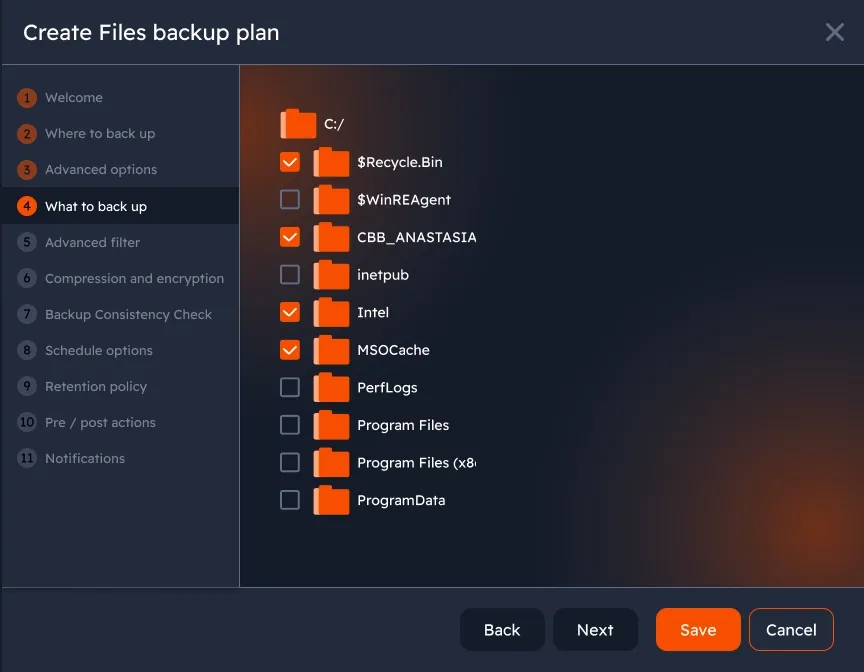
Choose files and folders to back up
Managed

File-level restore

Restore individual files or folders through MSP360's local Restore Wizard on your Mac. Or create restore plans directly from the centralized web console when managing backups through MSP360 Managed Backup.
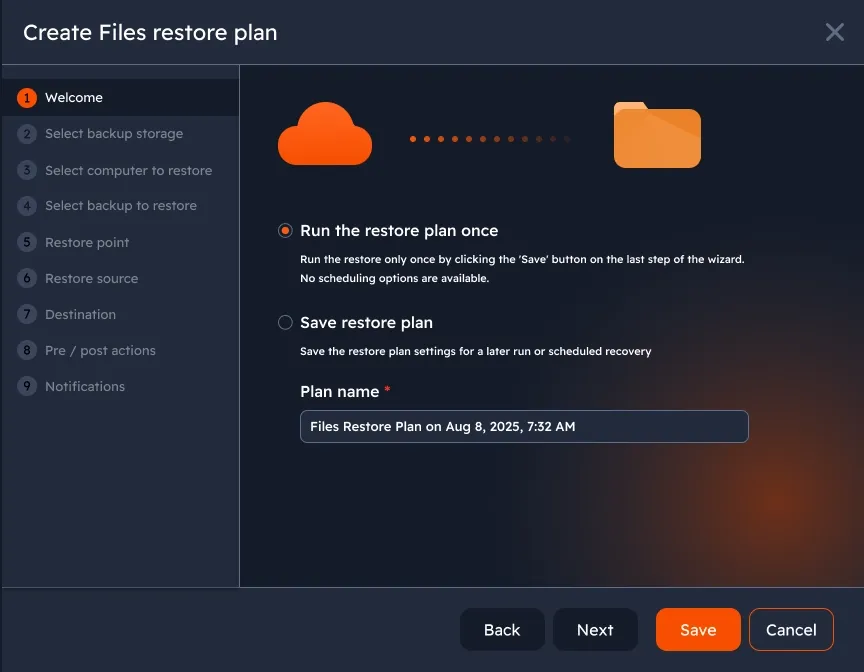
File-level restore

Automated and scheduled backups

Automate and customize backup schedules to ensure regular, complete backups.
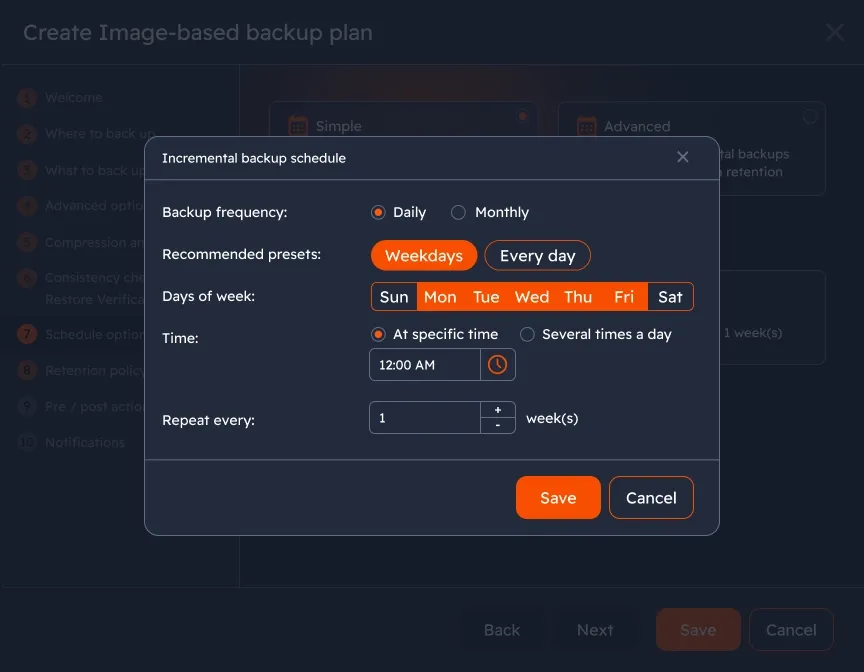
Automated and scheduled backups
Pro
Managed

Protect backups from modification and deletion with Object Lock

Enable Object Lock (immutability) on supported cloud storage to prevent backup copies from being modified or deleted until their configured retention period expires. This helps protect backups against ransomware, unauthorized changes, and accidental deletion.
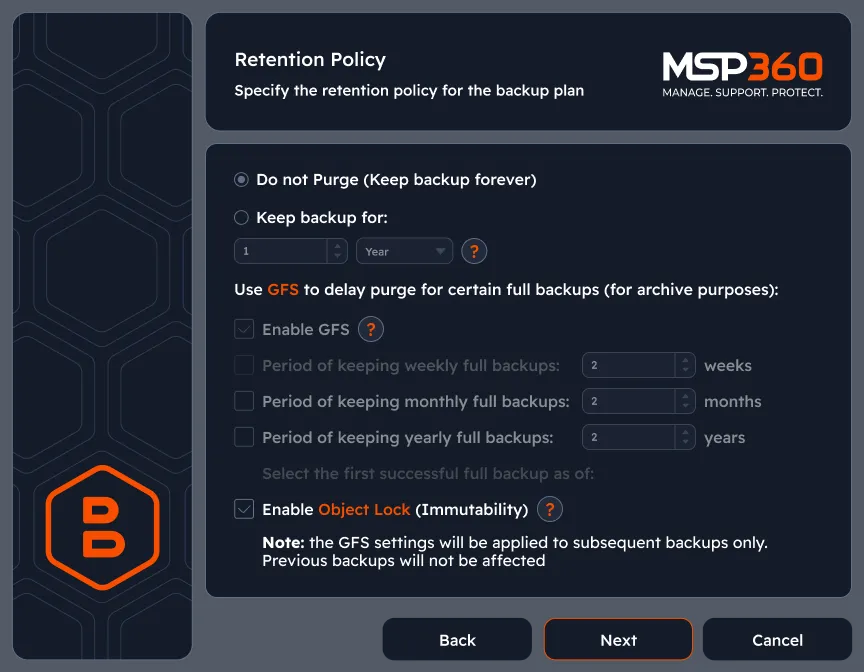
Protect backups from modification and deletion with Object Lock
Managed

Confirm backup integrity and restorability

Run consistency checks to verify that backup data in storage remains intact and available for recovery.
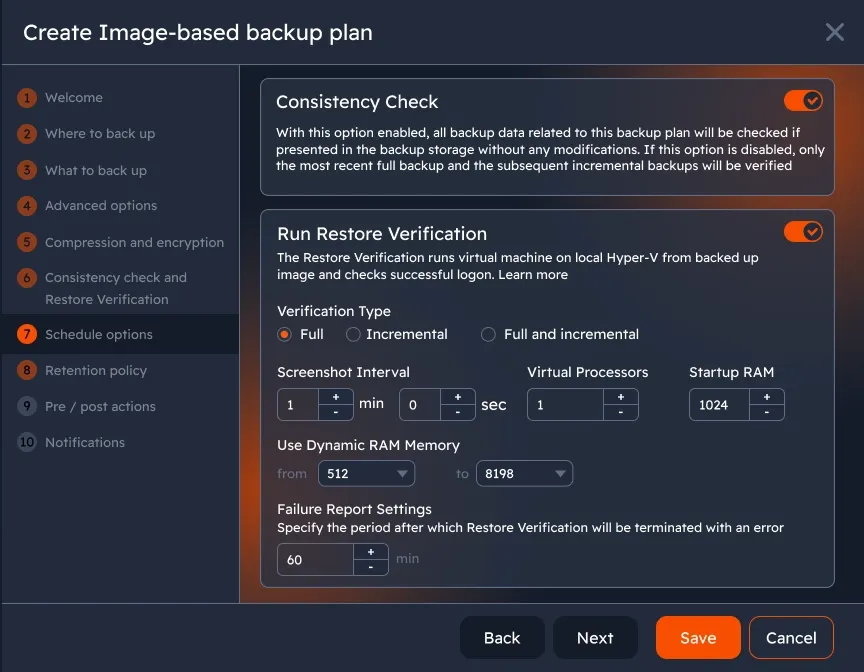
Confirm backup integrity and restorability

Centralized management

Access all features and manage all your Mac endpoints from a centralized web console. Back up your data remotely and control macOS devices in a single pane of glass.
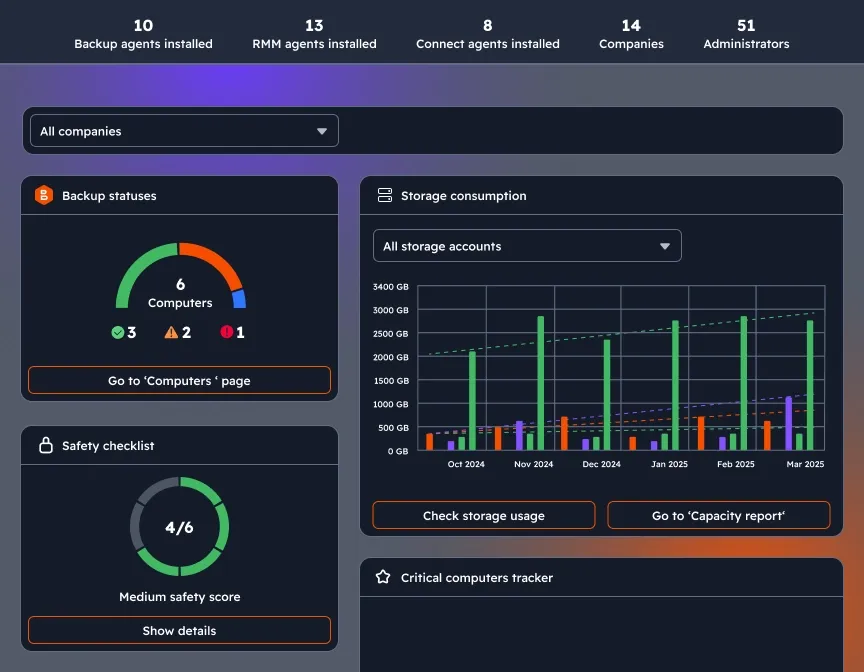
Centralized management
Managed

Customizable dashboard

Enhance visibility and control to your MSP360 management experience with a widget-based dashboard which combines information about backup statuses, storage consumption, license management, agent updates, and security settings on a single page.
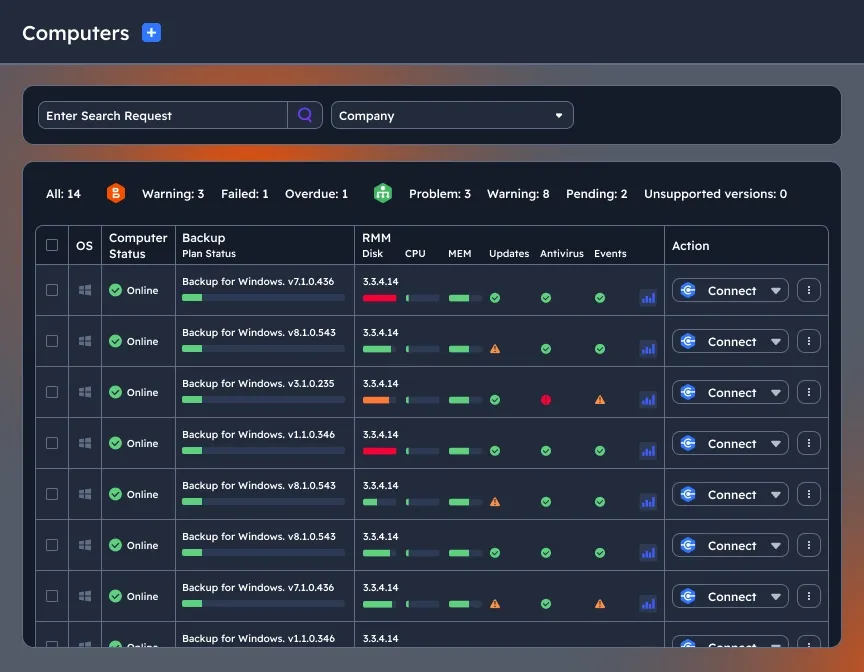
Customizable dashboard

Looking for backup solutions for Windows or Linux?

Try MSP360 Windows Backup Software or Linux backup software.
Backup solutions for Windows or Linux

Compare MSP360 macOS Backup Solutions

MSP360 Backup FreeMSP360 Backup Pro (Desktop)
Features
Best forPersonal workstation backupLocally managed backup
File backup
Encryption & Compression
Object Lock (Immutability)
Backup capacityUp to 5 TBUnlimited
SupportCommunity/forumEmail
Supported OSWindows, macOS, LinuxWindows, macOS, Linux
Price*
*Per computer, annual subscription. Price excludes VAT.
Free
Free Download
From $19.99 per computer / year
Buy Now for 19.99$/year
Compare Backup Editions
Built for MSPs

MSP Platform

MSP360 Managed Backup is part of the MSP Platform.

Great for MSPs or businesses with multiple Mac endpoints. One-stop-shop console with flexible monthly or annual payments. Ideal for MSPs and IT departments managing mixed-OS fleets.

MSP Platform Features

  • Centralized management
  • Advanced Reporting and Alerting
  • Rebranding
  • Mobile Application
  • MSP360 Connect Included
  • Support: 24/7/365 live technical support

MSP360 Mac Backup Software FAQ

What is the difference between MSP360 Backup Free, Pro, and Managed Backup?

MSP360 Free Backup software is a backup solution for individual Mac users who need basic file-level backup for personal use. MSP360 Backup Pro is ideal for users and businesses that need locally managed MacOS backup with encryption, compression, and additional protection features. However, it has a key limitation that sets it apart from MSP360 Managed Backup: there is no centralized management through a web console – users can only manage backups using a local agent.

Which macOS versions and Mac models does MSP360 support?

MSP360 Backup supports macOS 10.12 Sierra and later on Intel Macs, and macOS 13 Ventura and later on Apple Silicon Macs.

How is MSP360 Backup for macOS licensed and priced?

MSP360 Backup Pro for macOS follows an annual, per-computer subscription model starting at $19.99/year. MSP360 Managed Backup offers both monthly and annual payment options. Visit our Standalone Calculator or request a personalized quote for Managed Backup.

Why do I need macOS backup software?

Using backup software for macOS helps you protect valuable data from hardware failure, accidental deletion, ransomware, or other risks. Regular backups ensure you can recover files when needed.

What are the key features to look for in a macOS backup software?

  • Automatic scheduling: set and forget your backup frequency
  • Encryption: ensure data security
  • Version control: access previous file versions
  • Cloud support: enable remote storage options MSP360 Managed Backup supports all these features.

Can MSP360 back up both Intel and Apple Silicon Macs?

Yes, MSP360 supports Macs on both Intel and Apple Silicon architectures.

How secure is my data with MSP360 Managed Backup?

MSP360 encrypts backup data in transit and at rest to help protect it from unauthorized access, including when stored in the cloud.

Why choose MSP360’s Mac backup software?

MSP360 offers backup solutions for every need:

  • MSPs: Use MSP360 Managed Backup for centralized management, flexible billing, and support for Windows, Linux, macOS, VMware, and Hyper-V.
  • Local Management: Try MSP360 Backup Pro for locally managed backups.
  • Personal Use: Get started with our free backup software for Windows, macOS, and Linux.

Does MSP360 back up files or create a full system image?

On macOS, MSP360 performs file-level backup - you select the files and folders you want protected and restore them individually when needed. It does not create a full bootable system image of a Mac; image-based backup is a Windows capability.

Can I back up to an external drive, NAS, or cloud storage?

Yes. MSP360 backs up to local drives, network shares and NAS, and supported cloud providers (AWS, Wasabi, Backblaze B2, and other S3-compatible storage) or a combination of local and cloud destinations.

Is cloud storage included?

No. MSP360 Free and Pro are backup software with a bring-your-own-storage model: you connect your own cloud account and pay the provider for storage separately, or back up to local storage at no additional cost.

Resources Beyond MSP360 macOS Backup Software

To explore more valuable insights for enhanced cybersecurity, cloud storage best practices, and IT management, visit our Resources Center.

Article

How to Use Time Machine to Backup for Mac

Learn how to combine Time Machine with MSP360 Backup to store an additional copy of your backups in the cloud and recover data if your local drive fails.
See How It Works
Guide

Top 5 Tips for a safe Backup

Improve your Mac backup strategy with five practical tips covering incremental backups, cloud storage options, and the 3-2-1 backup rule.
Explore Backup Best Practices
Article

Ransomware on Mac

Macs aren't immune to ransomware. Discover how infections happen and what you can do to protect your files with security measures and regular backups.
Learn How to Stay Protected
Guide

Resize Partition on Mac

Follow step-by-step instructions to shrink or extend disk partitions using macOS Disk Utility, with precautions to help prevent data loss.
Follow the Step-by-Step Guide
Article

Remote support software for Mac

Discover how MSP360 Managed Connect enables remote access to macOS devices through a web browser or desktop application for easier IT support.
Explore Remote Access for Mac
MSP360 Backup for M365/Google

MSP360 Managed Backup for M365/Google

Cloud-to-cloud data protection for M365 and Google, featuring centralized management and support for all core M365 and GW components.
SaaS Backup Solution
MSP360 RMM

MSP360 RMM

All-in-one remote monitoring and management solution for MSPs and IT teams that helps streamline operations and reduce downtime
Remote Monitoring Solution
MSP360 Connect

MSP360 Managed Connect

Quick and secure remote access with centralized management, making it ideal for MSPs and IT teams to resolve issues without needing on-site visits.
Secure Remote Access
MSP360 Tickets

MSP360 Tickets

MSP ticketing system built into the MSP360 platform. Turn Backup and RMM incidents into tickets and manage them without leaving the MSP360 Management Console.
MSP Ticketing System