
Cloud to Cloud Backup Solution
MSP360 Backup for Microsoft 365 and Google Workspace uses a cloud to cloud backup architecture for SaaS data protection.






Cloud storage of your choice

Immutable backups
Direct to cloud upload
What is Cloud to Cloud Backup?
Benefits of Cloud to Cloud Backup
| Cloud to Cloud Backup | Cloud to Local Backup | |
|---|---|---|
| Cost Efficiency | Pay only for the storage you use | Requires upfront investment into local hardware |
| Deployment efforts | Fast and simple deployment with no local infrastructure required | Deployment requires significant time, expertise, and infrastructure |
| Scalability | Flexible capacity without disrupting users with high durability and uptime | Scaling requires companies to purchase extra hardware and perform manual provisioning |
| Automation and management | Easy to manage, eliminating the need for internal IT staff | Manual configuration requires additional human resources and increases the risk of errors |
| Backup data accessibility | Access backup data from anywhere with an internet connection | Storing data locally necessitates access either through physical presence or via remote access |
| Cybersecurity | Immutable backups with object lock protect against cyber threats and minimize data loss | Not standard, protection relies on self-managed infrastructure and security controls |
| Data loss risk | Backups are stored in highly durable, geo-redundant cloud storage designed for high availability | Can be subject to data loss from hardware failures and natural disasters |
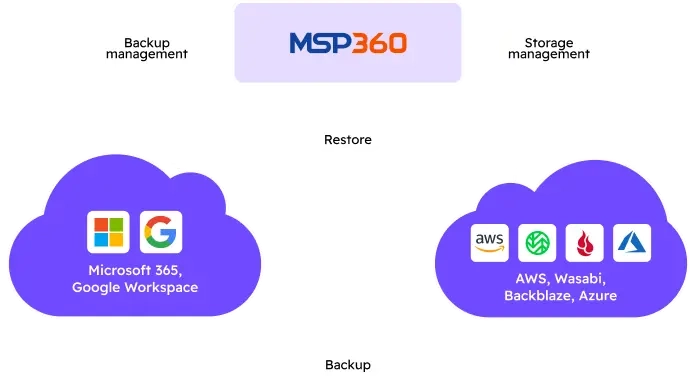
How MSP360 Cloud to Cloud Backup for Microsoft 365 and Google Workspace Works
Licensing and Pricing Considerations for Cloud to Cloud Backup
Backup for M365/Google
- Backup for M365 and Google Workspace
- Bring-Your-Own Storage
- Backup History
- Role-based access control
- Advanced encryption
- Item level backup and restore
- No hidden payments
- Reporting
- Retention Policy
- Audit Log
- Multi-factor authentication
- Group management operations
- Export to PST
- Email Notifications
- Support: Email support
Getting Started with MSP360
Find how to set up and configure the cloud to cloud Backup solution with the MSP360 comprehensive getting-started guide, designed to help you protect your M365/Google data quickly and efficiently.
MSP360 C2C Backup for Microsoft 365 and Google Workspace Overview

Getting Started Guide
This guide will walk you through the essentials of using MSP360 C2C Backup for M365 / Google, including how to backup your data, purchase licenses, set up storage destinations, and configure your MSP360 account.
Cloud to Cloud Backup Solution FAQ
What is cloud to cloud backup?
Why choose cloud to cloud backup?
Why do I need to back up Microsoft 365 and Google Workspace data?
How secure are MSP360 cloud to cloud backup solutions?
- Encryption in transit and at rest
- Immutable backups to prevent accidental or malicious changes
- Access controls & audit logs to track all backup and restore activities
What is the difference between SaaS backup and cloud to cloud backup?
Cloud to cloud backup describes the architecture used to copy data from one cloud service to another independent cloud environment. It explains how backups are technically stored and isolated.
SaaS backup, on the other hand, refers to a complete backup solution designed to protect data in SaaS applications such as Microsoft 365 or Google Workspace. It defines what data is protected, managed, monitored, and restored.
Resources Related to MSP360 Backup for Microsoft 365 / Google Workspace
Visit our Resource Center to explore valuable resources on backup and security best practices.
Understanding Microsoft 365 Shared Responsibility Model
Why You Need to Backup Microsoft 365 and How MSP360 Helps
Protecting Your Google Data: Why Google Isn’t Doing It For You
Protecting Your M365 Data: Why Microsoft Isn’t Doing It For You
How to Prevent Ransomware in Microsoft 365
Cloud to Cloud Backup Solution with MSP360
Data protection and quick recovery for Microsoft 365 and Google Workspace, with simple setup and maintenance.