
MSP Backup Software
White-label MSP backup software that eliminates vendor lock-in, reduces maintenance time, and provides seamless multi-tenant management.






Essential MSP Backup Software Features
Explore our unified, cost-effective, and secure MSP backup software and eliminate vendor lock-in, reduce maintenance time, and maximize profitability.
Manage clients remotely
Monitor, deploy, and manage backups for multiple endpoints remotely from a single web console. Gain complete visibility into your clients’ environments, track backup statuses in real time, and resolve issues without the need for on-site visits.
Centralized management
MSP360 offers a unified web console that enhances visibility, provides a single view of products and endpoints, and ensures centralized IT management through a single pane of glass across all platforms.
Multi-tenant support
MSP360 supports complex IT environments with multiple endpoints under management: save time and improve visibility by enabling group actions, customized backup policies, and tailored reporting across all endpoints.
White-labelling
Align with your own company’s style and brand identity and build trust with your customers, while still benefiting from MSP360 solutions.
Advanced monitoring and alerting
Set up tailored notifications, alerts, and reports to stay in control and resolve issues before they turn into bigger problems.
Regulatory compliance
Stay fully compliant with strong encryption, access controls, audit logging, and customizable retention to meet compliance needs.
Ransomware and data loss protection
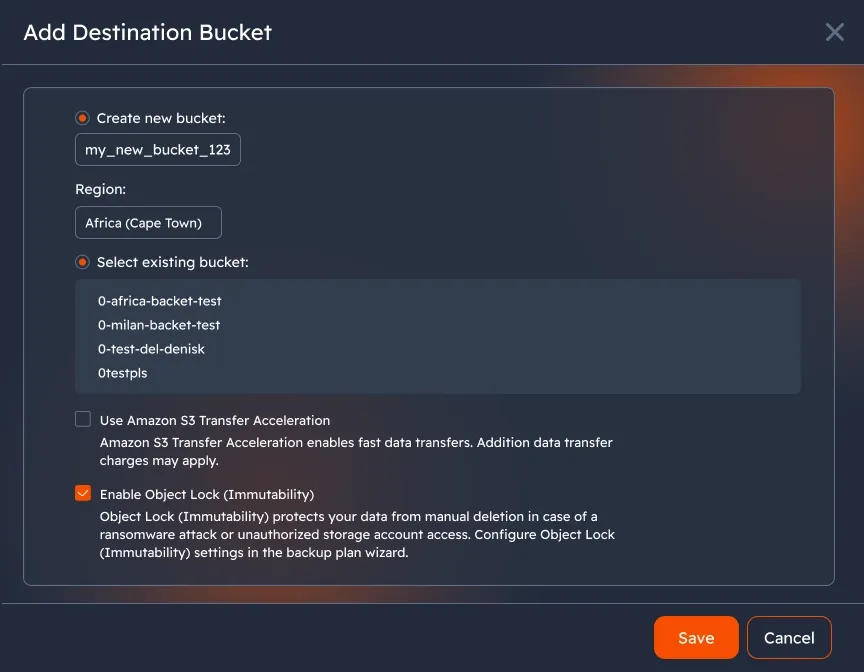
MSP360 Managed Backup ensures your clients’ data remains secure with object lock (immutability), preventing backups from being deleted or modified within a defined period. All data is encrypted both in transit and at rest, while versioning and flexible retention policies add an extra layer of protection against data corruption.
Bring-your-own storage approach
Get full control over costs, security, and flexibility by connecting to your preferred storage provider: MSP360 Managed Backup supports leading cloud storage providers, including Amazon S3, Wasabi, Backblaze B2, Microsoft Azure, Google Cloud, and IDrive e2, offering flexibility and redundancy. Back up to the cloud or to an external hard drive or network locations, including NAS devices.
Cross-platform compatibility
MSP360 Managed Backup provides multi-platform support for Windows, macOS, Linux, and virtual machines under a single platform.
Backup-as-a-service
With MSP360 Managed Backup, MSPs can offer backup-as-a-service to their customers. Take care of your clients’ most essential tasks while MSP360 manages regular updates, security, and platform maintenance, streamlining your service delivery.
Flexible recovery
Enable quick recovery with image-based backups that let you restore entire systems to new hardware or virtual machines. Bare-metal restore ensures recovery even if the operating system won’t boot, while granular recovery options let you restore individual files, folders, or applications.
MSP Backup Software for Every System
Desktop Backup
MSP Backup for Windows, Linux, macOS
Works on Windows 7 and later, Ubuntu, Debian, SUSE Enterprise, openSUSE, Oracle Linux, Red Hat, Fedora Linux, CentOS, Amazon Linux 2, macOS 10.12 Sierra, 10.14 Mojave, 10.15 Catalina, 11.0 Big Sur, 12.0 Monterey, 14.x Sonoma, 13 Ventura.
Start Free TrialWindows Server Backup
MSP Backup for Windows Server
Supported for Windows Server 2008 R2/2012/2016/2019/2022/2025.
Start Free TrialHyper-V Backup
MSP Backup for Hyper-V
Windows Server 2016 and later, Windows 10 and later (Enterprise, Pro, and Education editions).
Start Free TrialVMware Backup
MSP Backup for VMware
VMware vSphere 6.0 and later, Windows 10 and later (Pro, Enterprise), Windows Server versions 2016 and later.
Start Free TrialSQL Server Backup
MSP Backup for SQL Server
Supported for MS SQL Server 2008 R2/2012/2014/2017/2019/2022, MS SQL Server Express.
Start Free Trial
Compare MSP360 Managed Backup Editions
| Desktop | Server | MS SQL Server | Ultimate | Virtual Server | |
|---|---|---|---|---|---|
| Operating Systems | |||||
| Windows 7/8/10/11 | |||||
| Windows Server | |||||
| Linux (file-level only) | |||||
| MacOS (file-level only) | |||||
| VMware, Hyper-V | |||||
| Backup Types | |||||
| File-System Backup | |||||
| Image Based Backup | |||||
| MS SQL Server Backup | |||||
| Network Share Backup | 1 share | 1 share | 1 share | Unlimited | 1 share |
| Web-Based Remote Access FREE | |||||
| Licensing | |||||
| Licensed Per | endpoint | endpoint | endpoint | endpoint | host (2 sockets included) |
MSP Platform
MSP360 Managed Backup is part of the essential MSP Software stack.
MSP Platform is a solution designed for MSPs to centralize management of backup (including Microsoft 365 and Google Workspace), RMM, and remote access in a single console.

MSP Platform Features
- Centralized management
- Advanced Reporting and Alerting
- Rebranding
- Mobile Application
- MSP360 Connect Included
- Support: 24/7/365 live technical support
Getting Started with MSP360 Managed Backup
From this comprehensive guide, you will learn how to sign up for MSP360 Managed Backup, enter the web control panel, install the software on your machine, and start your first backup plan.
Product Interface
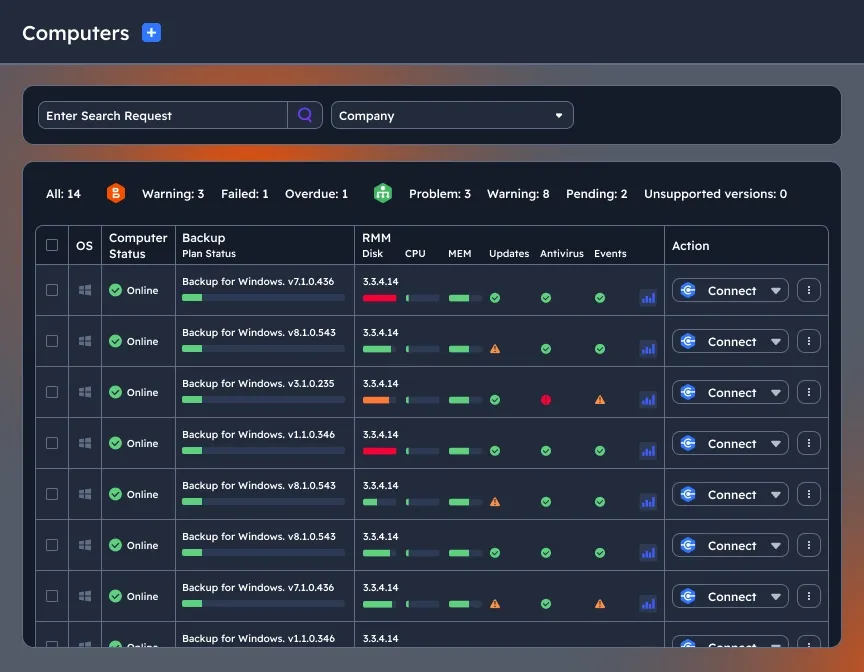
Manage multiple endpoints remotely
Gain full transparency and efficiency with multi-endpoint support: centrally manage backups, restores, remote monitoring, and endpoint control from a single platform.
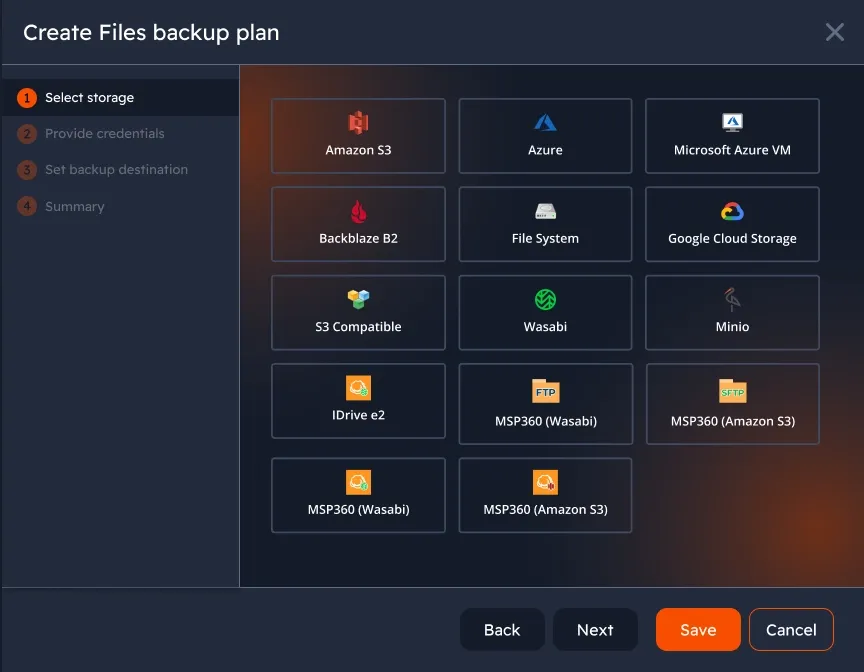
Freedom of storage choice
MSP360 is natively integrated with Amazon S3, Microsoft Azure, Wasabi, Backblaze B2, iDrive e2, or any S3-compatible storage, and offers built-in managed cloud storage through AWS and Wasabi you can use without creating or linking external accounts.
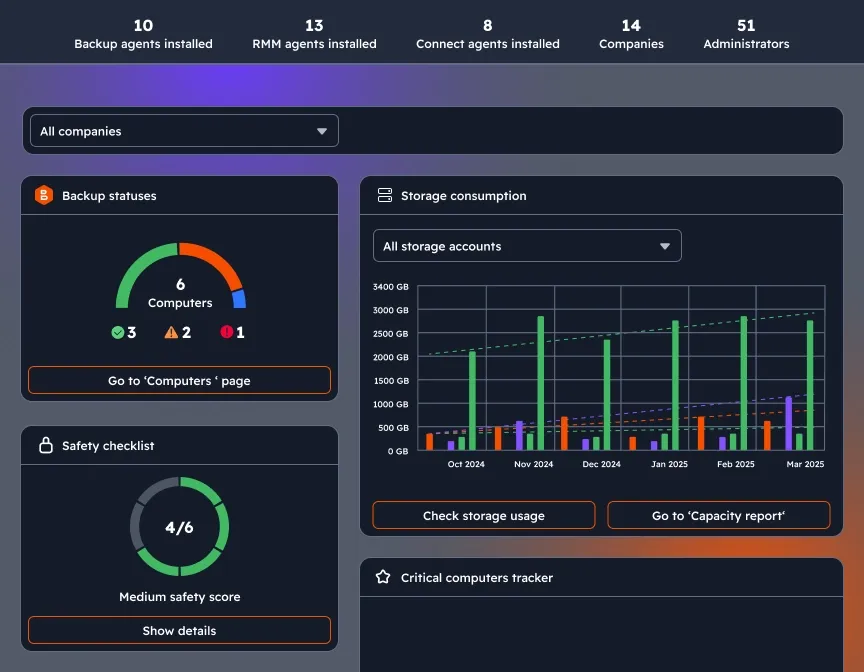
Widget-based dashboard
Get updates about backup statuses, storage consumption, license management, agent updates, and security settings on a single page.
Choose files and folders to back up
Implement our comprehensive file-level backup software and back up specific files and folders on your target machine to safeguard valuable data.
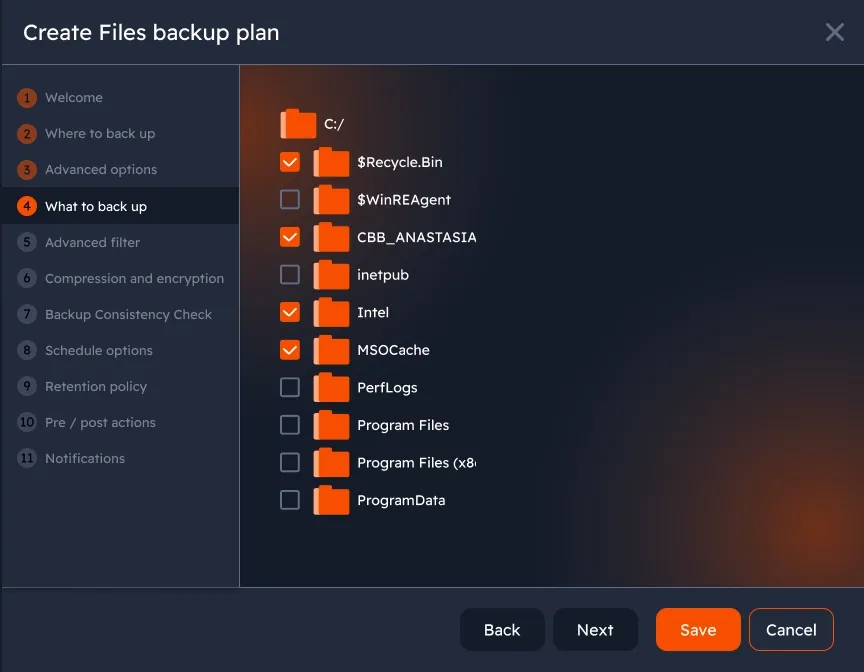
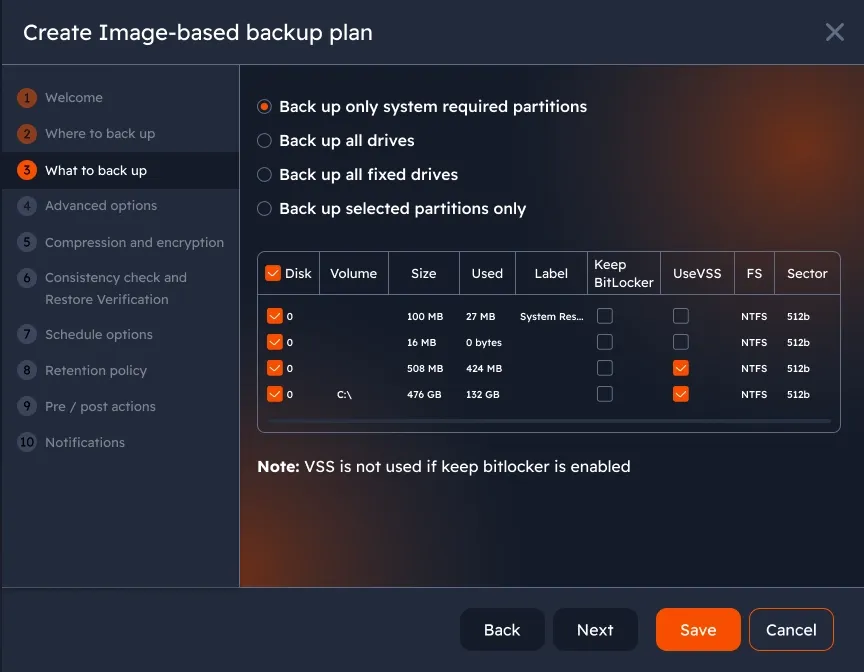
Image-based backup
Create snapshots of the entire system by generating an image file containing all data required to restore.
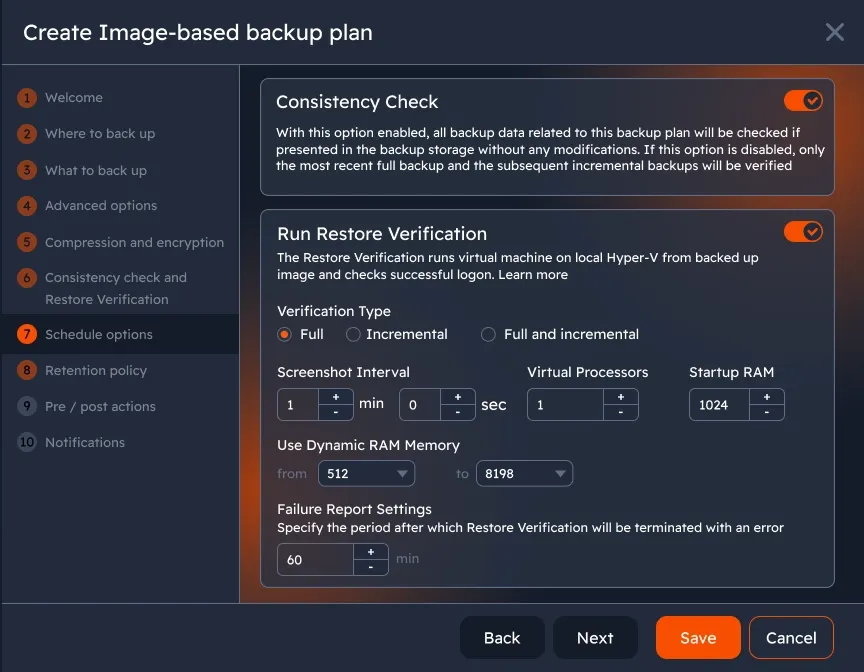
Consistency check and restore verification
Run checks on all backup data within each plan to ensure it remains intact and unaltered, and verify recoverability through restore testing.
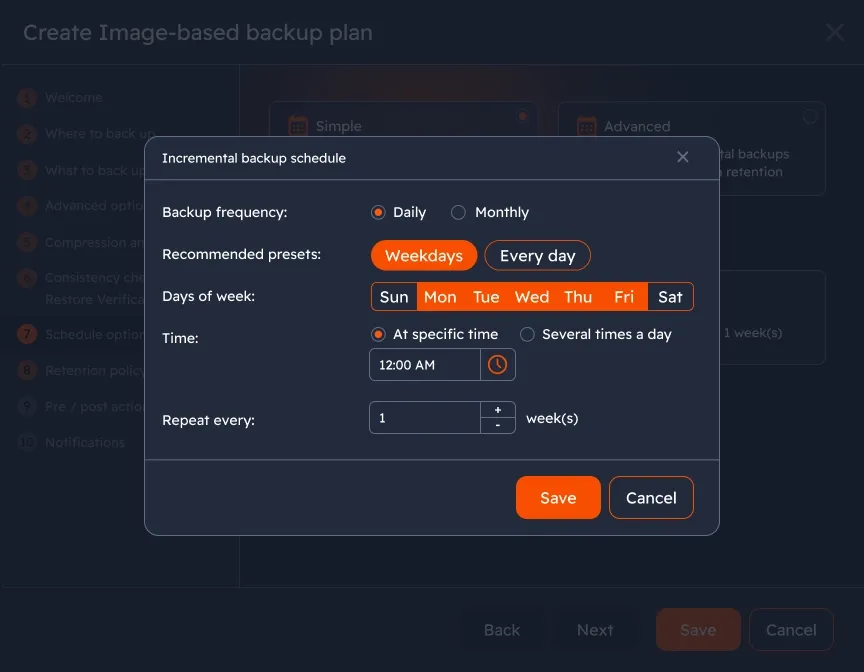
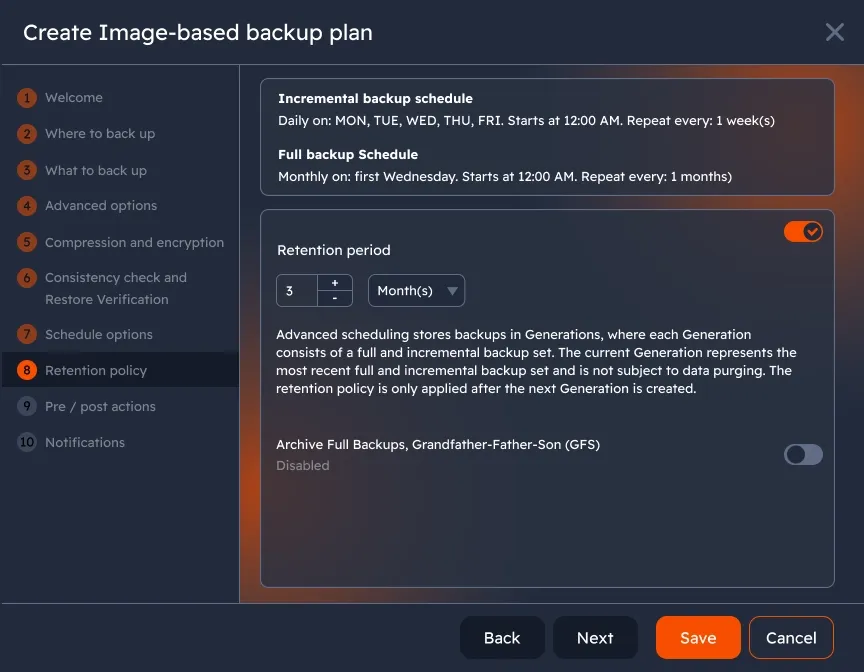
Advanced scheduling
Configure scheduling settings based on your needs and restore scenarios. Set up daily, weekly, or monthly backup plans to ensure consistent data protection.
Customizable retention settings
Retention settings let you choose how long backup data is stored to fit your specific needs, ensuring you keep necessary files.
Protect your data with object lock (immutability)
Immutable data backups are bulletproof to ransomware attacks because the data that was backed up can’t be altered. There’s always a guaranteed clean copy for recovery if your entire environment is hit by ransomware.
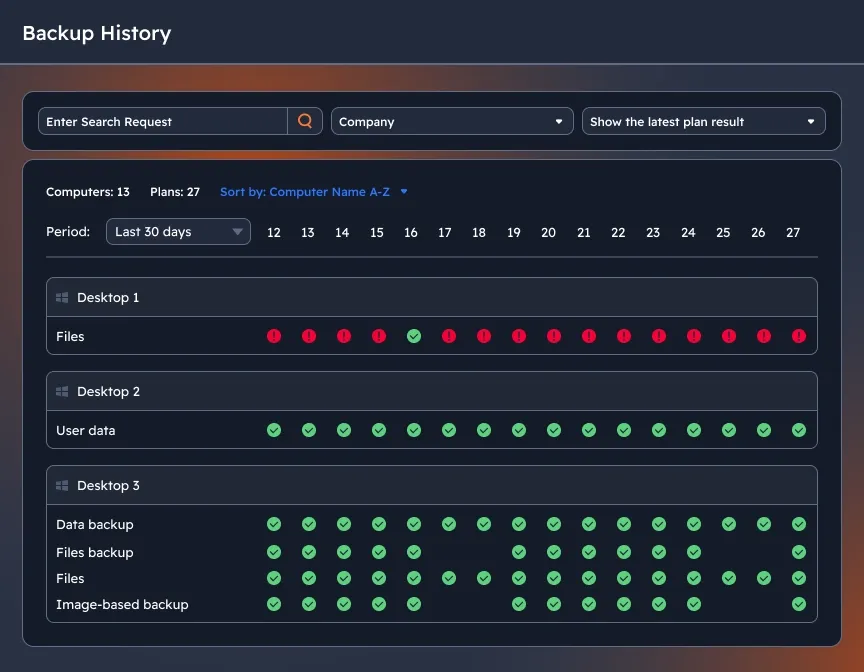
Advanced reporting and troubleshooting
The MSP360 web console features tracking of backup and restore activities of your users with a significant level of detailing. This helps MSPs and businesses gain insights for stronger analytics and cost optimization.
Flexible Storage Options with MSP360 Managed Backup
| MSP360 + S3 Standard | S3 Standard | S3 Intelligent-Tiering | S3 Standard-Infrequent Access | S3 One Zone-Infrequent Access | S3 Glacier Instant Retrieval | S3 Glacier Flexible Retrieval | S3 Glacier Deep Archive | |
|---|---|---|---|---|---|---|---|---|
| Price Per 1 TB | $23 flat | from $23 | $10-$23 | $12.50 | $10 | $4 | $3.60 | $0.99 |
| API Calls | Free | Paid | Paid | Paid | Paid | Paid | Paid | Paid |
| Data Egress Fee | Free | Free | Paid | Paid | Paid | Paid | Paid | Paid |
| Minimum Retention Period | — | — | — | 30 days | 30 days | 90 days | 90 days | 180 days |
| MSP360 Managed Backup + AWS | ||||||||
| Object Lock Support (Immutability) | ||||||||
| File and Image-Based Backup | ||||||||
| Synthetic Full Backup | ||||||||
| GFS | ||||||||
| Restore Verification | ||||||||
| Encryption | ||||||||
| FFI Backup | ||||||||
| Unified Billing | ||||||||
Start Free Trial of MSP360 Managed Backup
Experience seamless data protection with our MSP backup software.
MSP360 Cloud Backup Software in Review















Frequently Asked Questions About MSP Backup Software
What is the difference between MSP360 Free Backup, Pro, Managed Backup?
How is MSP360 Managed Backup licensed and priced?
Can MSP360 Managed Backup scale as my business grows?
What features should I look for in an MSP backup software?
- Automated and scheduled backups
- Support for file-level and full-system backups
- Encryption for data security
- Compatibility with leading cloud storage providers
- Centralized management for multiple devices
Is technical support included?
With MSP360 Managed Backup, you can choose between Standard Support and Premium Support options:
Standard support is provided with no extra costs, but the support is provided within longer periods of time.
Premium support: get 24/7 Premium Customer Support with faster response times, priority handling, and live remote assistance for critical disaster-recovery cases.
Can MSP360 Managed Backup scale as my business grows?
What is the difference between MSP360 Free Backup, Pro, Managed Backup?
How is MSP360 Managed Backup licensed and priced?
Can MSP360 Managed Backup scale as my business grows?
Resources Beyond MSP360 Cloud Backup Solutions
Visit our Resource Center to explore valuable resources on backup and security best practices.
MSP360 Managed Backup Resources
Standardize for Profits with the MSP360 Platform
MSP360 Managed Backup Best Practices
MSP Workflow: Core Tasks Streamlined by Backup and RMM Solutions
Explore other MSP360 solutions
MSP360 Managed Backup for M365/Google
MSP360 RMM
MSP360 Managed Connect
Start Free Trial of MSP360 Managed Backup
Experience seamless data protection with our MSP backup software.